Get posts sent to your inbox:
The problem with the intranet
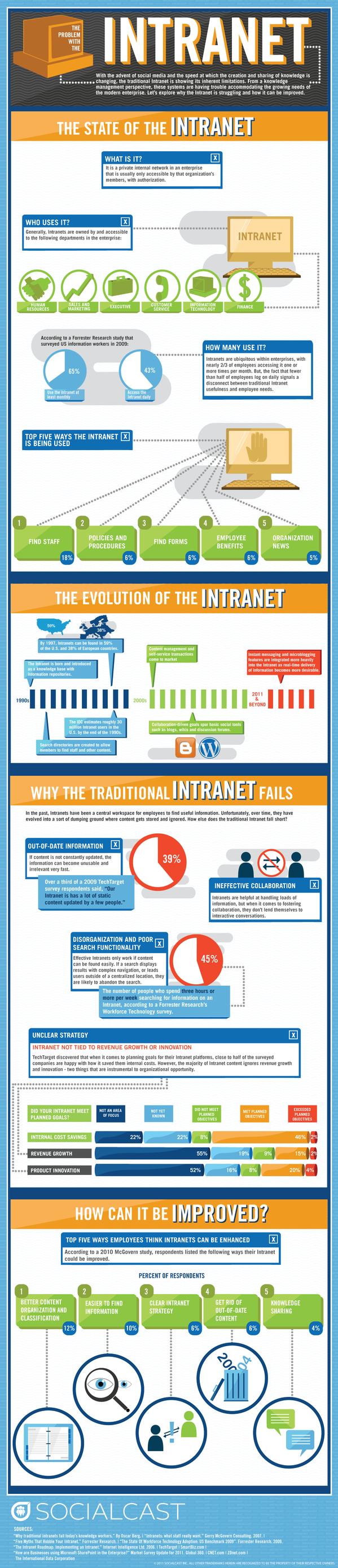
I sometimes think there are a few too many of these infographic things floating around, but I thought this was a really interesting one!

An online notebook
Get posts sent to your inbox:
An online notebook
I sometimes think there are a few too many of these infographic things floating around, but I thought this was a really interesting one!
Tuesday 25th October 2011
Feedback from previous Digital Engagement workshop
The workshop provided me with a better understanding of the advantages & pitfalls of social media – Tourism Development Officer, Ceredigion County Council
The workshop was informative and lent itself well to interaction with well thought out activities – PR Officer, Coleg Morgannwg
Useful insights and experiences shared. Very knowledgable and practical. – Information Systems Consultant, Newport City Council
Dave is very engaging and informative – E-Communications Officer, Mid & West Wales Fire & Rescue Service
Very engaging and knowledgable – Head of Consumer Strategy, Remploy
Interesting. Good use of examples. Relaxed interactive discussions. Good mix of activities & discussions – PR Officer, Coleg Morgannwg
We are delighted to announce this workshop introducing Public Sector organisations to the opportunity offered by the web and social media to enable effective engagement with citizens and communities.
 Facilitated by Kind of Digital’s Director, Dave Briggs, who has a wealth of experience advising government on digital engagement at all levels; from small local authorities to 10 Downing Street – attendees will come away with a full grasp of the background and potential of this work as well as a practical toolkit to get underway.
The agenda, a blended mixture of engaging talks, group discussion and practical exercises, will include the following sessions:

As well as the training on the day, attendees will benefit from post-event support and learning. This includes exclusive access to a follow-up web conference and an online support forum.
Click here to book your place.
AGENDA
9.30am: Registration
10.00am: Introductions and housekeeping
10.15am What is digital engagement, and why is it important?
* The background to digital engagemen
* The opportunities it offers for local government
10.45am: Introducing the digital engagement toolkit
* What are the key tools?
* How have they been used across the public sector
11:15am: The importance of a strategic approach
* Why having a strategic approach to social media activity matters
* The best way to balance strategy and experimentation
11.30am: Coffee break
11.45pm: Strategy development workshop – writing your own digital engagement strategy
* Objectives
* Implementation
* Evaluation
* Risk management
1.00pm: Lunch break
1.45pm: Overcoming barriers
* What are the blockers in many organisations for getting social media activity going?
* How to manage them
2.15pm: Planning a social media campaign exercise
* Group exercise to design effective social media projects, using the right tools and involving the right people
3.45pm: Coffee break
3.55pm: Social media question time
* An opportunity to ask questions of the group and facilitator to work out issues in more depth
4.25pm: Close and next steps
* Further online support: webinars and forum
4.30pm: Workshop ends
Delegate Costs : If you book your place before 19th August, you receive the benefit of an early bird discount, so don’t delay!
Early bird price – £200 + VAT
Standard price – £250 + VAT
Address:
CCT Venues Smithfield
2 East Poultry Avenue
London
EC1A 4PT
Map and Directions
Start Time: 9:30 am
End Time: 4:30 pm
The marvellous Rich Millington is giving away a fabulous ebook on developing online communities.
Rich’s blog, Feverbee, is packed full of great hints and tips, and I recommend you subscribe to that.
All you have to do to get the ebook is to sign up to the mailing list for his Pillar Summit online learning course during September – just a couple of weeks left, so get in quick!
And yes, this is a great way of getting people to sign up to a newsletter like this!
My friends at LGIU, The Hansard Society and Networked Neighbourhoods are running a free event next month in London that looks dead good:

Wednesday 19 October, 18.30 – 20.00
Thatcher Room, Portculis house, Westminster
LGiU, Networked Neighbourhoods and the Hansard Society are putting on a free event in Parliament on Weds 19th Oct.
We will be exploring the ‘relocalisation’ of the web and debating whether hyperlocal and community websites a vital democratic tool or if they lead to insularity out of step with an increasingly globalised world?
Panel:
Chair:
Jonathan and Hugh will also discuss some of the early findings from the ‘Residents Online’ research project. If you are a Councillor or council officer and would like to take part in the survey, more information can be found here.
Tickets
To register, please email hans_admin@hansard.lse.ac.uk, or book online or phone 020 7438 1216.

Here’s another cool little tool. ifttt, or ‘if this, then that’ is a way of automating tasks across your social networks. It describes itself as ‘digital duct tape’.
It basically allows you to set rules and actions to happen whenever you interact online.
One example described on the site is creating a task that whenever a photo is uploaded to Instagram, it should also be added to your Dropbox account.
Just to test it, I’ve created a task that emails me everytime someone mentions me on Twitter. Not particularly useful, or unique, but the process for creating tasks is very user friendly, and the potential is huge, with lots of different services included, such as Facebook, Google Reader, Foursquare, Delicious, Tumblr, WordPress… the list goes on.
It’s a cool idea and I am sure that people more imaginative than I could come up with some great uses of it!
Apologies for the light blogging this week, I’ve been doing a lot of travelling about.

Still, I came across Trello yesterday, a cool and lightweight planning tool. It allows you to create lists of actions, which can be filled in with all sorts of information, and dragged and dropped into different orders.
Here’s a video explaining it further:
http://www.youtube.com/watch?v=aaDf1RqeLfo
Well worth a play for simple collaboration and project management.
A quick note to mention some of the projects Kind of Digital is working on.
CiviCrowd
This is the name we have given to our WordPress-powered ideas crowdsourcing platform. South Holland District Council are going to be using the service to encourage people to suggest ideas for projects that will help their communities.
This will be linked to the ward budgets that councillors there have been allocated, with the CiviCrowd providing a mechanism for people to suggest ideas to their councillors.
The site should be launching in the next few weeks, and I’ll be sure to let you know exactly when that happens!
Lincolnshire coastal cultural SMEs
This is a project we are working on with Lincolnshire County Council, to provide support to small and medium sized enterprises in the arts and culture sector, that are based on Lincolnshire’s coasts. It’s all about providing training and guidance to these organisations to help them use technology like the web, social media, and also innovative hardware to promote what they do.
This is a year long project, so I’ll be posting occasional updates here on progress as we go along, and I’m really pleased to have Fraser Henderson and Tim Wilson on board to help deliver it.
Alconbury Airfield
An interesting one this, as we are working with the regeneration company Urban and Civic (warning: flash-heavy website!) to help them engage online as they develop the Alconbury Airfield site near Huntingdon.
We’re building an online engagement hub, to allow people to provide the sort of feedback usually only received during traditional open day style events, as well as working with the team to help them develop digital engagement strategies, policies and systems to make the most of online discussion of the project and the wider area.
If you’re looking at running a project remotely similar to these, and need a helping hand, don’t hesitate to get in touch!
ACAS – the Advisory, Conciliation and Arbitration Service, who you’ve probably heard of on news reports about negotiations between employers and unions – have published some guidance for employers on how to manage staff use of these sites at work.
Smart phones, internet, tweeting, blogging – we have accepted all of these innovations, and many more, as part of our working lives, helping us to work more flexibly, stay in touch for longer and respond to each other more quickly.
But is it all good news? Some estimates report that misuse of the internet and social media by workers costs Britain’s economy billions of pounds every year and add that many employers are already grappling with issues like time theft, defamation, cyber bullying, freedom of speech and the invasion of privacy.
So how should employers respond to the challenges posed by social networking tools at work?
New research from the Institute for Employment Studies, commissioned by Acas, advises employers to:
- draw up a policy on social networking
- treat ‘electronic behaviour’ in the same way you would treat ‘non-electronic behaviour’
- react reasonably to issues around social networking by asking ‘what is the likely impact on the organisation?’
Worth checking out.
I had a go at doing an email newsletter once before – put a signup form here on the blog, got quite a few people to subscribe, and then never got round to sending a single issue. Useless!
Part of my trouble then was that I wasn’t that comfortable with the software. Recently though, for a few projects, I’ve been playing with MailChimp and been dead impressed with it. So, I thought I would have another go.
Click here to sign up for DaveMail, a weekly email newsletter that will feature a fresh article that won’t get published here on the blog, plus a list of great links for anyone wanting the best of the web’s coverage of digital engagement and other technology stuff.
I’ll be publishing every Sunday, so there will hopefully be at least one nice email waiting for you on Monday morning!
Interesting article by the erstwhile US government CIO Vivek Kundra, in the New York Times:
AS the global economy struggles through a slow and painful recovery, governments around the world are wasting billions of dollars on unnecessary information technology. This problem has worsened in recent years because of what I call the “I.T. cartel.” This powerful group of private contractors encourages reliance on inefficient software and hardware that is expensive to acquire and to maintain.
Kundra posits that an increased use of cloud computing as being the answer to this problem. As Andrea DiMaio points out though, that might not quite be the solution, after all…
Let’s take the cloud. Vivek and others have done a lot to move the federal government in that direction. On the other hand, if any significant economies of scale must be achieved, there will be only a handful of suppliers that can provide what is needed. When migrations will accelerate and thousands of workloads, application and data will be in some form of cloud – be it private, government or public – why should cloud suppliers not establish a cartel? What evidence do we have that they really want to pursue interoperability and portability – so that their clients really have choice about where to source their IT services – as opposed to sharing the market as usual?
I find this stuff so that you don’t have to.
You can find all my bookmarks on Pinboard.
A quick plug of this great workshop being delivered through the Public Sector Web Network (about which I will shortly have some very exciting news!).
Social Media for Emergency Planning & Resilience
Thursday 22nd September 2011, Park Plaza Hotel, Leeds
This workshop is aimed at all Category 1 Responders as identified in the Civil Contingencies Act 2004 which includes the usual “blue-light” emergency services as well as others:
A category one responder or other organisation planning for major incidents should:
This workshop will help attendees to not only maximise the benefit of situational intelligence but also manage social media flows robustly and warn and inform the public effectively.
Please contact Nick Hill at nick@publicsectorforums.co.uk to reserve a delegate place!
Workshop Facilitator: Ben Proctor
Ben has a background in Public Relations, Information Technology and Emergency Planning. In 2008 he saw that emergency response and crisis communications were going to be strongly affected by developments in mobile and online technology so he set up Likeaword to become a centre of expertise in digital skills for emergencies. Ben is based in Shropshire, UK but works across the country with category one responders and other organisations looking to manage their response to emergencies. He works with emergency planning and business continuity professionals as well as with corporate communication specialists.
Agenda
1 Welcome and introduction
2 Check we’re all on the same page
3 Use of social media for warning and informing the public
Social media offers responders a simple, low cost broadcast medium and many responders have begun to use it in this way
Lunch
4 Managing feedback in the social media space
Social media allows all individuals and organisations access to the same simple, low-cost broadcast medium. Individuals may ask for clarification, they may challenge or may spread rumours or contrary information.
5 Working with the online community
Social media and online technology gives responders potential access to a worldwide community of relevant skills. This section will introduce the topic.
6 Wrap up
Address:
Park Plaza Hotel
Boar Lane, City Square
Leeds
LS1 5NS
Map and Directions
Start Time: 9:30 am
End Time: 4:30 pm
Price: £200.00 + £40.00 Surcharge
Please contact Nick Hill at nick@publicsectorforums.co.uk to reserve a delegate place!
I’ll be joining my good friends at Learning Pool on the 14th September in celebrating their Community Day – where the UK’s biggest public sector online learning community will be coming to life.
The packed agenda features plenty of reasons to sign up for a place, if you haven’t already.
Keynote presentations from Dr Andrew Learner of iESE and Dean Shoesmith, President of the PPMA are followed by interactive seminars on topics as diverse as engaging people with e-learning, measuring return on investment and making the best use of emerging technology (I’m helping out with that one).
The day will be rounded off with the Learning Pool Customer of the Year Awards, which are always good fun – and I’m sure the party will carry on afterwards too.
Five more reasons to attend:
So, with just a handful of places left, sign up now!
Nice article by John Naughton on the state of IT education in schools:
What is happening is that the national curriculum’s worthy aspirations to educate pupils about ICT are transmuted at the chalkface into teaching kids to use Microsoft software. Our children are mostly getting ICT training rather than ICT education.
And if you can’t see the difference, try this simple thought-experiment: replace “ICT” with “sex” and see which you’d prefer in that context: education or training?
How we got to this ridiculous state of affairs is a long story. It’s partly about how education departments, like generals, are always preparing for the last war. Thus, while we’re moving into a post-PC age, our ICT curriculum is firmly rooted in the desktop computer running Microsoft Windows. It’s also partly about the technophobia of teachers, local councillors and officials. But it’s mainly about the chronic mismatch between the glacial pace of curriculum change in a print-based culture, and the rate of change in the technology.
Good stuff from Michael Coté:
In moving to a BigCo job you quickly notice how different life behind the firewall is when it comes to IT. You’re often more limited than empowered. The advances in consumer IT (things like Facebook and GMail) often have created better IT than corporations provide their employees. For well over a decade, corporate IT has been chasing the old mandate of risk management through hyper-control. In the meantime, consumer IT has shot past the old bulwark of the IT department when it comes to ease of use, functionality innovations, and the resulting leaps in productivity. Consumer IT has set a new baseline for what knowledge workers need to be most effective and most corporate IT has fallen well below that line.
I didn’t know you could do this. Maybe you don’t either, so I’ll share it.
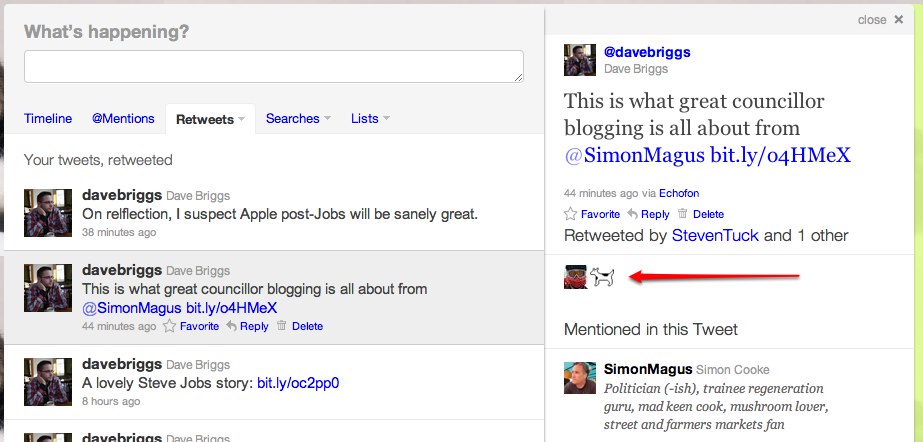
How do you find out which of your tweets have been retweeted, and by who? Turns out, by looking on the Twitter website!
First, go to twitter.com and log in. Then click the little ‘Retweets’ tab just under the updates box. Should look a little like this:

Click on ‘Your Tweets, retweeted’, as per the arrow.
You’ll see a list of all your tweets that others have retweeted. Cool!
If you then hover over one, and click, a detail pane should pop up, giving info on exactly who retweeted you. Click the image below to make it bigger, if you need to.
So now you know.
I think it’s fair to say that DCMS’s plans for Local TV are mostly terrible.
Luckily, people who know a lot more about it that I do are writing it all up. I enjoyed these three posts on the LSE blog on the subject, all by Sally Broughton Micova.
They are well worth reading for anyone interested in local media.
Local TV Part 1: A Tale of Two Cities
The DCMS’s framework document states that “market experience suggests that small standalone local TV stations can struggle to develop s sustainable business model”. However, the Government’s plan is to issue individual local licenses and then leave it up to the market to determine if local stations give it a go alone or come together in a network. This means anyone interested in opening local television and broadcasting through DTT in Birmingham will have to individually negotiate with whoever might be interested in Hereford, Grimsby, or any of the other 60 plus locations. News Corporation, which owns a large number of local TV stations in the US and controls two of those in Birmingham Alabama, has other problems at the moment, so it seems unlikely it will be interested in applying for a multitude of individual local licenses in the UK. It is not clear how a backbone of sufficient size and capacity to adequately support local TV across the UK will spontaneously emerge from the negotiations of a few enthusiastic local parties.
Local TV Part 2: Great Expectations
One of the ways the Government’s plan intends to provide financial support to local TV is by having the BBC spend up to £5 million annually for 3 years to buy content from local stations. At the local TV summit Hunt also suggested that local TV will be selling content to other national stations. This is problematic for two reasons. Firstly, £5 million divided among several stations will amount to very little in relation to the budgets required to make high quality content. Secondly, local stations will have to produce content that national stations will want to buy. Consider the plea from Shameless’ Paul Abbott for British producers and commissioners to try making television drama at a cheaper cost of only £500,000 per episode. Or, that national stations in the UK are currently spending their budgets procuring high quality production from independent producers and hit series from the US.
Local TV Part 3: Don’t start linear
The proposal, to use the digital terrestrial television (DTT) platform and create linear television stations across the UK, is already old fashioned enough. It is admirable to invest in local media, but new technology allows more innovative and more sustainable ways of doing it. Putting local TV onto DTT multiplexes (MUXs), even in a first stage as the Government proposes, is an unnecessary investment, and one that sets local television off on the wrong foot in terms of both sustainability and purpose.
I find this stuff so that you don’t have to.
You can find all my bookmarks on Pinboard.
Having been playing with Google+ for a while, I’m starting to get to grips with things. I’m seeing it as a place to talk geeky stuff, where I won’t bore the large group of people I am friends with on Facebook who aren’t obsessed by the internet. Twitter remains my default place to share stuff online though. A few things have occurred to me that would improve the service:
1. Let me sort out my Google identity crisis
A few others have made this point – most consistently, Dan Harrison – but those of us that use Google to host our email using our own domains (ie my dave@kindofdigital.com email address is set up using Google services, and thus is a ‘Google Account’ in its own right) can be in a bit of a pickle.
Luckily I’m not the position that Paul Clarke found himself in, as I’ve always used a vanilla Gmail account for most of my interactions with Google. But it would be nice that those of us who are actually paying for the Google service get as full an experience as those using free accounts.
2. Find a way of making circles quicker
It’s got some lovely little visual tricks, but the circles interface just takes too long to organise. It’s also something that you can only get right after having used the service for a while – ie once you’ve already got hundreds of people in your circles and it’s too much of a pain to fix.
In other words, circles has got the technology pretty right, but the process isn’t great and Google needs to find a way of speeding it up.
3. Make better use of my other streams: email, docs, Reader
It strikes me that Google has a bunch of my other content and information that it could be making use of within the Google+ interface. After all, through Reader it knows what my favourite websites are, and which I pay most attention to. With Docs it knows who I probably work with, because I share documents with them.
It would be great if G+ became my Google service dashboard, where I can access all my own Google-stored data but also all the stuff shared by the people I know.
4. There is a distinction between +1ing something and sharing it, but it isn’t that pronounced
I guess the comparison to Twitter is that +1ing an item is like marking it as a favourite; and sharing is like retweeting. But Twitter is a very different beast to G+ and I’m often left wondering whether I should share, or +1 a bit of content. In the end, I usually don’t bother to do either.
5. Why on earth hasn’t Google killed off Buzz? It’s another potential confusion
Not much more to be said. Buzz was Google’s previous effort at doing something like Twitter… and not only have they not killed it off, they even include a user’s Buzz updates as a tab in their Google+ profiles. I don’t know why this is there as it appears to be a confusing duplication of effort and features.
Maybe all I want is FriendFeed?
Whilst I was thinking about all this, it made me wonder whether the grand sharing tool I seem to want Google+ to be might in fact exist, in the form of FriendFeed, the forgotten social sharing site bought by Facebook a few years ago.
I went and took a look, and lo! FriendFeed still seems to be running, albeit without much love. Here’s mine.
If you’re new to the site, it enables you to pull all your social content into one place (tweets, bookmarks, blogposts, Facebook statuses, shared Google Reader items, etc etc) and subscribe to other people’s feeds.
One downside to this is a bit of duplication (ie, if I post something on my blog, and then tweet a link to it, it’ll appear twice in my FriendFeed) – but that’s easy enough to overlook.
So I do wonder if, for Google+ to have something that sets it apart, looking back to FriendFeed might be a good idea.
I find this stuff so that you don’t have to.
You can find all my bookmarks on Pinboard.