Get posts sent to your inbox:
Geek excitement
I just won one of these on ebay:

It works, too. Can’t wait to have it up and running. Anyone up for a game of Chuckie Egg?

An online notebook
Get posts sent to your inbox:
An online notebook
I just won one of these on ebay:
It works, too. Can’t wait to have it up and running. Anyone up for a game of Chuckie Egg?

Effective Social Media & Web 2.0 Strategies for Local Authorities is a new event from Public Sector Forums, happening at Old Trafford Stadium, Manchester on 30 April 2009.
I have the pleasure of chairing the event, as well as giving a talk on how local authorities can be using Facebook to engagement with and provide information to residents.
Other speakers include the excellent Tim Davies and Simon Wakeman, amongst others.
You can find out more on the PSF event page, and book online too.
There has already been a great deal of interest in the day, so you need to book early if you want to come along!
I’ve just found out that my sister is on Twitter.
Do say hello to her – I’m sure that as a press officer for a big charity, she’d love to hear how they can be using Twitter and other services to engage people in their stuff.
Stuff I have bookmarked for March 4th through March 8th:
Cambridgeshire County Council have put up some videos on their YouTube channel from the leaders of the three main political groups on the Council.
The aim of the videos are to encourage people to put themselves forward to become councillors.
As the Council’s press release states:
The films represent a first for local democracy in Cambridgeshire, with the leaders broadcasting individual messages on the importance of people coming forward as councillors for the County Council elections, to be held on 4 June 2009.
The videos are classic talking head style, and as with all initial attempts at this stuff, they are a little stilted. But that’s fine, and hopefully these councillors, and others, will continue to use YouTube as a communications tool – after all, with more practice things will always improve.
There doesn’t seem to be a single place for people to go to find out about becoming a councillor anywhere on the web at the moment – there is information on individual council sites, of course, and CLG have some bits too. London Councils have a special site to encourage people to consider standing for election. However, the content is very static and not particularly engaging.
Having some video stuff from councillors explaining what they do and what is involved would be great, I think, along with links to councillor blogs and other information resources. Even better would be some sort of interaction between those who are considering being a councillor and those with experience to pass on. Something to humanise the whole thing a little.
I wrote a little while ago about how council’s websites might look, and ventured the idea that perhaps all that is needed is a big search box.
Look what Cheltenham Borough Council have got now!

OK, so it isn’t the home page, but it has extra use as it searches other local sites too.
Great work. If anyone knows the folk behind this stuff, can you make sure they come along to LocalGovCamp? 😉
Last week, the Cabinet Office published a new action plan for government and open source, to level the playing field when it comes to procuring software.
So we consider that the time is now right to build on our record of fairness and achievement and to take further positive action to ensure that Open Source products are fully and fairly considered throughout government IT; to ensure that we specify our requirements and publish our data in terms of Open Standards; and that we seek the same degree of flexibility in our commercial relationships with proprietary software suppliers as are inherent in the open source world.
Excellent stuff. There is a Netvibes dashboard set up to help monitor what is being said online, some of which is a little cynical and critical. I tend to prefer to be relentlessly positive.
Anyway, the situation with open source is a little similar to that of social web stuff, in that knowledge about it, and its possibilities, are somewhat limited. We need open source digital mentors!
Alternatively, we just need a wiki.

OpenSourceGov is a simple MediaWiki site which aims to collect together all the information a civil servant might ever want to know about open source and the options it makes available. Hopefully it will soon be able to answer questions like:
As well as many others.
Please do visit the wiki, and make use of the (currently limited) information on there. Even better, register for an account and add or edit some stuff you know about and share it with everyone else!
Stuff I have bookmarked for February 26th through March 3rd:
…that is struggling with some of this stuff.
Take a look at Phil Bradley’s marvellous post, railing against the attitudes of CILIP (the Chartered Institute of Library and Information Professionals):
The next section really did make my jaw drop. “In terms of “official” activity, cyber life is just like real like (sic) – if it happens in a CILIP-sanctioned space, it’s official; if it happens down the pub or in someone else’s space, it isn’t.” This is a classic ‘ownership’ issue – if we say it’s real then it’s real, and if we say it isn’t real, then it’s not. If I’m in a CILIP sanctioned space (whatever that is!) do my words and arguments take on more meaning than if I’m not? Or perhaps I need to have an official CILIP representative to add some gravitas to my comments? We don’t live in a world when the organization or PR department can control the message any longer – things have moved on, and the webpage/site, while important, is no longer the sole place in which activity can take place.
Looks like another good example for David’s (and others) membership project.
I wrote a little while back about a fairly terrible website being used by Cambridgeshire’s Transport Commission to consult people on their views.
Cambridge News now reports:
A PROBE into Cambridgeshire’s transport crisis – including the idea of a congestion charge for Cambridge – has been hit by a technical blunder.
The chairman of the Cambridgeshire Transport Commission, Sir Brian Briscoe, has revealed the commission’s website has been affected by “initial teething problems”.
The result is that some of the responses to the commission’s request for people’s views on how to tackle the traffic issue have been lost.
People are now being contacted to resubmit their views. Let’s hope they can be bothered.
Oh dear oh dear. I found out that this website cost the sum of £2,990 to produce. Now, that might not sound like a huge amount, but for a microsite like this it’s a sizable budget. What the Transport Commission got for their money was – frankly – piss poor, and it now turns out that it doesn’t even work properly.
Didn’t you know cars come from out of the ground? 🙂

Taken near Waterbeach Station, this morning.
I’m currently having a good sort out of this blog – and will be relaunching it with quite a few changes in the near future.
I have found that running a self-hosted blog is a bit like running a PC, in that it gets clogged up with stuff that you install and then don’t use any more, you end up with files all over the place which aren’t very well managed, and then there is the look and feel of the thing, which I’ve never felt I have got just right.
You don’t need to worry about things going wobbly on the site though, as I am working on a local copy, running on my MacBook. This is through the joy of a brilliant little app called MAMP, which covers all the difficult stuff of getting Apache, PHP and MySQL running on the Mac.
With MAMP, all you have to do is download and install it, then start it up. It gives you instant and easy access to turning local servers on and off, creating and editing databases and all sorts. It really makes the whole process ridiculously easy.
For Windows users, there are equivalent apps like XAMPP, though not having used it I couldn’t vouch for how good it is!
So, for my local development of DavePress, I have locally installed a fresh WordPress 2.7.1, and then used the import function to pull in my posts and pages from the current version.
I did this rather than just import the whole database because there are tables in the current setup for plugins I no longer use, etc, and I want to keep things fresh where I can.
I’ve also installed the base theme I will be using, which will be Thesis, an extremely customisable theme which has had some great reviews from respected WordPress guys like Neville. I’ll be tweaking it to make it a bit more personal to me, and adding in plugins as I need them.
Another big job is to find all the images I have inserted into posts and make sure they are either a part of WordPress’ media manager or on Flickr. At the moment, files are all over the place: in different folders on the DavePress server, on Skitch, other image hosting services, on other websites where I have pinched them from… Having all photos on Flickr and other images inside my WordPress file structure will make managing my images and backing them up an awful lot easier.
Finally I want to take another look at the various static pages of content here – like About, Services, Resources etc – and give them a rewrite and make the whole site a bit more useful and professional.
This all means it may be a little while before I can relaunch this site, not least because it all has to be fitted round my proper work. Hopefully it will be worth it though!
A quick note on the LocalGovCamp site on who should consider attending.
And on The Connected Republic, a call to local gov folk in other nations to consider running their own event.
Simon Wakeman has a thought-provoking post on whether Councils should maintain corporate presences in social networking sites like Facebook at all:
People using social networks befriend (or fan, whatever the appropriate phrase is) organisations, movements, clubs etc on Facebook and other social networks because they have an emotional bond of some description with that entity.
They might be fans in the muscial or film sense (eg by signing up to a band’s page), be replicating membership of an offline group (eg by signing up to a sports club’s page) or be part of a shared interest movement (eg by signing up to a campaign or political group’s page).
All of these conscious choices by individuals using social networks are done because they have some empathetic or emotional relationship with the entity to which the page belongs. They become a fan because they want to and because they care in some way.
How does this sit with a local council? In the real world I’m not convinced people have such a bond with their council as a corporate body – yes, they have that emotional or empathetic reaction about many of the services that their local council provides them, but not about the council as a whole. There’s no real world basis for the creation of an online community.
As Liz’s research shows, one can see where Simon is coming from. Councils, at the moment, are not fairing terribly well on social networks.
I’d agree, as I have noted before, that making people become friends or fans of public bodies probably isn’t going to work. I commented on Simon’s piece:
However, there is a convincing argument for me that public bodies should be providing information to people in a format and in a location that suits them. There are many people who wouldn’t ever dream of visiting a council website who none-the-less might find the information available there useful. The trick is to present that information where they are likely to find it.
I think I’ve identified a way in which local authority, indeed any government organisation, can approach Facebook presence in a way that won’t embarrass those that use it. More soon.
Stuff I have bookmarked for February 9th through February 25th:
A few things have been happening behind the scenes, and I think it is about time that LocalGovCamp was ‘officially’ launched in some way. I guess this is it.

The event will probably take place in June, probably in Birmingham but definitely on a Saturday.
All the plotting and planning will take place on the blog, so do make sure you subscribe to the RSS or the email alerts.
Once we have a few of the basics sorted out we can start focusing on some of the fun stuff, like what people want to hear, what they want to talk about and who will be ordering the pizzas.
A tweet from the Public Sector Forums Twitter feed alerted me to this story of Stockport Council’s Facebook presence, which, at the time the article was written, wasn’t particularly popular:
A LOCAL authority which reached out to the Facebook generation has suffered an embarrassing snub.
Stockport council set up a page on the social networking site with the aim of spreading the word about its services.
But six months on, the authority has been exposed as an online pariah – after it attracted only six ‘fans’.
I’m delighted to say that as a result of this publicity, the Council now has 46 fans – almost as many as DavePress!
What can be learned from this? That if you build it, they won’t come.
Anything that a council, or any other organisation, does on the web needs to be pushed, promoted and managed. These are the human elements which are so important in engagement excercises. An online project like this will not succeed if you just put it together and then sit back expecting people to join in droves.
This is partly an online marketing issue, and partly one of community management. I doubt there are many in local government who have these skills listed as being required for their jobs, but they are becoming more and more necessary.
There is another issue, peculiar to Facebook, which is one of vocabulary. Does anyone really want to become a ‘fan’ of their local council? Surely there is some more appropriate wording that could be used…
Simon Dickson reports on the new site from the UK Government which currently aggregates news from around the country on what help is available to help businesses and individuals through the current economic difficulties.
Fundamentally, in this initial build, it’s a news aggregation site – pulling together material not just from national sources, but regional and local too. The aim is to complement the citizen- and business-facing stuff, at Directgov and BusinessLink respectively, by showing what’s actually happening on the ground, well away from Whitehall and the City.
I’m involved in the project from a content point of view, which at the moment is mainly a job of identifying content to be tagged in Delicious to appear on the site. A dashboard has been set up to monitor various news sources around the UK to make sure we pick up a good range of stories.

The site came together very quickly and is a great example of agile and flexible development. We’re hoping to be expanding it in the future to produce some original content, but at the moment it presents a nice picture of what’s going on out there.
I treated myself to a new toy today, a Mac Mini. Here it is, next to the rather splendid curtains in our spare room:

To be honest, I really want a nice big iMac but can’t afford it. The Mini is a nice, relatively cheap alternative. Working on a MacBook all the time really isn’t good for the eyes – and with the Mini plugged into a 20″ monitor, that’s no longer a problem.
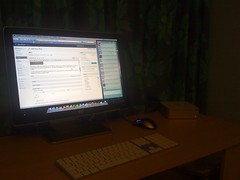
In terms of grunt, the Mini is slightly less powerful than your average MacBook, but seems to be fine with what I need it for. Editing video might be a struggle, though.
Thanks to the ever-resourceful Peter Clark, Open Coffee has come to Cambridge.
Excellent!