Get posts by weekly email:
Bookmarks for September 28th
Stuff I have bookmarked for September 28th:
- The power of unconference at Helpful Technology – Steph's summary of the ukyouthonline unconference
An online notebook
Get posts by weekly email:
An online notebook
Stuff I have bookmarked for September 28th:
One of the highlights of yesterday’s UKYouthOnline unconference was Steph Gray‘s presentation of some Forrester research commissioned by DIUS on what online services are regularly used by young people.
Steph has generously posted his slides on Slideshare:
[HTML1]
It’s been a great start to the day at UKYouthOnline. You can follow the twitter back channel (no snarkiness spotted yet, must be a record) at http://search.twitter.com/search?q=ukyouthonline and I’m uploading a few photos at http://www.flickr.com/photos/tags/ukyouthonline
Do join in by leaving messages wherever you can!
Stuff I have bookmarked for September 26th:
I have started a wiki to collect together resources and stories of where local government has used the web in interesting ways. You can find it at http://localgov.pbwiki.com/ – please visit and add any bits you can think of. If you need the password, it’s mentioned a couple of times on the home page.
This post is part of my ’10 Social Media Steps’ series. Find them all here.
The first step in the social media journey is to go and find what other people you might know are up to. As well as discovering how other people are using the social web, it will allow you to start establishing your online social group.
Social networks are sites which link you to other people you know, and help you find people that you don’t know but who you might get along with. They tend to make it possible to create a profile for yourself, explaining who you are and what you are into, send messages to people, easily share things like photos, videos and weblinks, and form groups with like minded folk.
Here’s a great little video from Common Craft telling you what social networks are all about:
[HTML1]
There are a number of social networking sites out there. Which one you choose depends on what your main areas of interest are, and which ones have most of your existing contacts on. The big three, for example, are:
There are others though, too:
There are also a number of social networks that focus on specific issues, such as:
There are literally thousands of such networks out there. Just do a search with the words ‘social network’ along with the topic you are interested in and you should find one. If you don’t it might be nice to start one of your own – some tips on how to do this will come later.
The first thing to do is to register with your social network of choice. My tip would be to have a go with a few – that way you can test them out, see who else is using them and decide where you want to spend most of your time.
When you do register, you’ll be given a chance to find people you already know who are on the network – often this is done by giving the social network access to your email contacts list. You get to mark people as friends, or contacts and depending on the network, you may have to wait for them to confirm that you both have heard of each other.
You will also be invited to add details to your profile. This will include contact information, stuff about your likes and dislikes, and whereabouts you are based. This will make it easier for other people who are interested in the same things as you are to find you – as well as the people you already know.
Once you have signed up with a social network, and found some friends, it’s time to do some digging! Click on your friends’ profiles, and find out what stuff they are doing. They might be uploading photos or videos, or sharing web links. You can usually post public messages to them (on Facebook it’s called a ‘wall’) and have conversations out in the open that others can join in too. Otherwise, you can contact them using a private message, or email.
Some social networks gives you a space to people know what you are up to – on Facebook it is called your ‘status’. It’s a good idea to regularly update this as it will alert people if they can help you out in some way, or just reminds them that you are about!
If you have some digital photos or videos of your own saved on your computer, you might want to upload some of these to your profile too. Social networks are a good place to start sharing stuff online, because – in most cases – what you put online can only be viewed by people you have marked as friends. This means you should feel pretty safe about it.
Have a look through some of the groups your friends are members of – if you can’t find any that you’d like to join, you ought to be able to search for groups you might want to be a part of. Groups are another great way of meeting new folk to connect with. If you still can’t find one that does what you want it to, why not create a group of your own? You can fill it full of details and invite people to join who you think might be interested. Starting a group on a social network is a fantastic way of gathering people around an issue – just take ColaLife as an example.
After you have been using your social networks for a while, you might start to get a little frustrated. One of the reasons is that many social networks are what is known as ‘walled gardens’ – you can upload all the content you like to the website, but getting it out again is pretty hard. So, if you upload a photo to Facebook, it is then difficult to then share it on other sites, unless you re-upload to them. Also, what about the poeple you know that aren’t members of the same social network as you? Again, this can lead to duplication of effort, and a fragmentation of your network.
Groups present another challenge. Whilst they are great at building a buzz around a issue, it’s often pretty hard to move things onto the next stage, where collaborative action can start. This often means having to move the group out of the social network and onto another platform, which can means losing an awful lot of members.
Social networks are therefore great for:
In the next step, we’ll be looking at how you can find and read the content that is important to you, using RSS.

I’m going to be running a session at the NCVO Information Conference on 24th November. I’m facilitating one of the practical workshops, playing the social media game to help delegates put some of what they have learned on the day into some kind of context.
It looks like it is going to be a great event, with some top speakers including Euan Semple and Ed Mitchell. It should also mean that I get to meet Laura Whitehead for the first time, despite having known her virtually for quite a while now!
Stuff I have bookmarked for September 22nd:
The team behind the UK Parliament‘s website – which also includes accounts on Twitter, YouTube, Facebook and others – have launched a WordPress blog. The Purpose of the blog seems to be focusing on the development of the Parliament website, including the development of a number of social web services.
I’m subscribed to the feed, and have added it to Public Sector Bloggers too.
Neil Williams has a nice post about the way he has built up his network using Twitter:
Twitter, the micro-blogging site to rule them all, has introduced me to more relevant contacts more quickly than any other web 2.0 tool. Or other human being for that matter.
Some people just don’t like Twitter, and that’s fair enough, although I think that much of the time it’s more that they don’t like the way some people use it. One example of terrific use of it, though, comes from local government, of all places.
Quite a few local authorities have Twitter feeds now, as an extra channel of communication between the council and the folk who live in the area. OK, so there are unlikely to be that many Twitter users in each authority’s locality, but as an add-on bit of comms stuff, it’s pretty cool.
However, quite a few of the web teams behind these feeds have set up extra ones, which represent just the webbies themselves. So, not a feed with information about council, but actualy with news of what the web guys are doing and which they use to talk ides through with others. These feeds are seeing a considerable amount of activity and are increasing the interactions between these teams to an extent which I really don’t think happened before.
What’s even better though is the fact that others are being drawn into these conversations as well – it being Twitter, this is no walled garden. So when one local gov web team asks what people think about some of the stuff they are doing, they get responses from not just other local authority folk but also feedback from people like me, who might have a different perspective on things.
It’s a great example of the use that these social networks can bring, as long as you approach them in an open, and collaborative way, of course.
The local gov web team twitter feeds are:
Have I missed any?
I have made another quick addition to Public Sector Bloggers, with the availability of an OPML file to download. Rather than subscribe to the combined feed, you can instead import each individual feed into your RSS aggregator in one go.
To do this, first right-click the link and choose whatever your browser offers as a term for downloading the file to your computer. If in doubt, left click the link, then when you are confronted with what looks like a page of code, choose ‘Save Page As’ (or similar) from your browsers’ file menu. Do remember where you saved it!
Next go into your aggregator and choose to import the file to add to your feeds. This will differ depending on which one you use. I’ve found some handy help files online:
If you need any help, yell in the comments, or email me.

Next weekend is a busy one for webheads in London. Not only is it UKYouthOnline (which I am attending) but also Barcamp London 5 is happening. Sadly, that’s all booked up. But never fear! Harry Metcalfe is organising a spillover event for those that couldn’t get themselves on the original Barcamp list.
The wiki states:
BarcampLondon5 is full. Lots of people who wanted to go couldn’t get tickets. We figured: why not have our own, extra, mini-barcamp? The British Computer Society kindly volunteered to host, so it’s on: we’ll have a one-day barcamp on the Saturday (27th).
So, if you want some barcampy action in London that day, you’ve still got a chance. And if Harry has anything to do with it, it’ll probably be better than the ‘proper’ one. Book yourself a spot here.
I’ve been putting a bit of work in updating the Public Sector Bloggers site, which aggregates a load of feeds from folk in the public sector who blog (duh…) in one place. The website gives a quick overview on the latest additions, or you can subscribe to a combined RSS feed or by email.
One thing I have changed is how the feed is generated. Before, I used Yahoo! Pipes to merge them all, which was a bit of pain in the neck. So I have now gone for a much easier way, which is to organise all the feeds in my Google Reader into a specific folder, and made that folder public, meaning it produces an RSS feed. I then use that feed to drive the site. Now to add a new feed, I just need to subscribe to it myself, and whack it into the right folder. Easy.
When I mentioned it last time, I had quite a few suggestions for additional feeds to add to the service. I’ve added quite a few more, so the list now looks like this:
Again, if I have missed anyone obvious out, please do let me know.
Stuff I have bookmarked for September 19th:
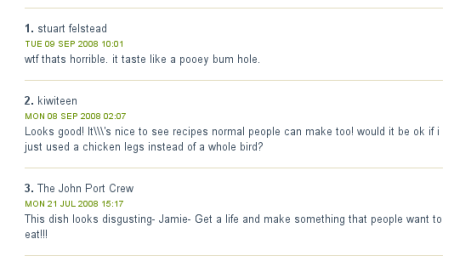
One of the great arguments in favour of employing social web tools is the fact that they are pretty quick, and usually cheap, to put together. However, that’s not taking into account the other costs, one of which is managing the community created by such sites.
This entails a number of things: welcoming new people, seeding some discussions, encouraging people to get involved. At the bare minimum it should consist of moderating content, getting rid of the rude, the crude and the jibberish. You simply have to allow for time to do this. Otherwise you end up with problems like those that Jamie Oliver, everyone’s favourite fat-tongued foodie, seems to be having.

Does this sort of thing actually present anyone in a good light?!
I’m working my way through my dead tree reading list, and right now I’m burning through Seth Godin‘s Meatball Sundae. It’s terrific stuff.
Here’s one nugget from early on in the book -a list of ‘the foundations of new marketing’. It works for stuff other than marketing, though, I reckon, and might serve as a useful way of describing what worldview 2.0 might be:
I wonder how many of these things can be applied to government and the governed, rather than producers and consumers?
Stuff I have bookmarked for September 17th:
My idea for the Building Democracy competition is now up and live on the site, awaiting your comments! Please visit the entry and leave your thoughts, even if it is just to say what an amazing vision it is, and what an awfully clever chap I am.
Ta!

Bookings are flying in for ReadWriteGov, the social media shindig I am organising along with Fran Paterson, which will be held at Peterborough City Council on 29th October.
Responding to a bit of feedback I have received, I have added an option to pay the (miniscule) cost of the tickets by requesting an invoice, which should make it easier for some folk to come along. So now nobody has an excuse!
Stuff I have bookmarked for September 16th: