Thursday, 12 April, 2012

What I’ve been reading

I find this stuff so that you don’t have to.

You can find all my bookmarks on Pinboard.

PermalinkWhat I’ve been reading

Wednesday, 11 April, 2012

Every government project should be a Project WIP

I love Project WIP – Shropshire Council’s blog about their efforts to redesign their website.

It’s got a great tone and style, is useful and interactive and gives people a chance to know what is going on behind the scenes, and to get involved too.

It’s also really helpful – take their latest post about responsive design and DPI as an example.

Camden Council did something similar with their web rebuild too.

Why just website projects though? Why aren’t all government projects reported on in the open, via a blog?

It would increase transparency, allow for interested folk to contribute from the outside and open up the teams involved to all kinds of goodwill.

PermalinkEvery government project should be a Project WIP

Wednesday, 4 April, 2012

Avoiding hyperlocal tragedy

From Rich Millington, in his post “The Tragic Story Of Hyperlocal Communities“:

If we want to build hyperlocal communities, we have to change the way we think about them. This isn’t a technology problem to solve (Facebook-style). Enabling everyone to start a hyperlocal community wont make it happen. This isn’t a content problem to solve (local news style). Pulling in RSS feeds and encouraging user generated content wont solve the problem.

What we need is a genuine community building approach. You identify your first members, initiate discussions, invite members to participate in those discussions, write content about what’s happening in the community, and repeat as you grow.

PermalinkAvoiding hyperlocal tragedy

Galaxy Nexus

So, a couple of weeks ago I had an accident* and my iPhone broke for good. I needed a replacement, which gave me a good opportunity to assess the options.

It came down to the iPhone 4S and the Galaxy Nexus. I opted for the latter, for reasons I will explain. However, if someone were to ask me which is the best phone, I’d still say it’s the iPhone, hands down. But for my particular circumstances, the Nexus suited me.

So, why choose the Galaxy Nexus (GN from now on)? First of all, it’s the latest flagship phone from Google, designed to show off the Android platform at its best. It’s made by Samsung but to Google’s specification, and also features the latest version of Android, called Ice Cream Sandwich, unadulterated by any other crud that carriers or manufacturers like to install on Android phones.

I’m a heavy Google user, we use it for Kind of Digital’s email and calendaring, etc, and the integration with Android is excellent. The Gmail app on the GN is far better than the iPhone’s default mail app (certainly if you are a Gmail user, anyway). As email is by far and away the most used app on my phone, this is pretty important!

One of the other considerations was cost. I generally prefer to pay for my phones up front rather than get a subsidised phone via contract. By getting an unlocked, sim-free phone, I can shop around and get a better deal for me. I usually manage to make this pay for itself within a year. I managed to get the GN for a smidgeon under £400 – which is considerably less than an new unlocked iPhone 4S would cost.

In terms of apps, the Android platform is still way behind the Apple ecosystem. The market place, now called ‘Google Play’ – perhaps because of the emergence of other market places for Android – is still full of junk, and it’s too hard to find the good stuff. Also quite a few cool apps just aren’t available for Android yet, which is a real shame.

However, for my needs, the main ones are all there. There’s a NatWest app for banking, a rail enquiries app, Dropbox, Evernote, Facebook, Twitter, Remember the Milk for to do lists, and so on. Pretty much everything I really need is in there.

Some thoughts on having used the phone for a few days:

  • It’s *just* too big. My hand aches if I use it one handed for any length of time
  • It’s thin – but almost too thin. I do worry I might break it
  • It’s light – the iPhone 4 and 4S have real heft. Despite its size, you often forget the GN is in your pocket
  • It’s the best keyboard I’ve ever used on an Android device, by which I mean it’s actually possible to use it without going insane
  • It has a really useful widget on the home screen that lets me switch things like wifi, GPS and 3g on and off as I need them without having to mess around in the settings – dead handy
  • I need to figure out how to get my iTunes library onto it so I can stop carrying my iPod around too

Overall, I’d say that the iPhone is the best handset you can get right now. As much as I like my GN, it’s not as nice to use as an iPhone and it lacks the app ecosystem. However, for my personal circumstances – particularly my reliance on Google’s platform – the GN works pretty well and I’m happy enough with it.

Dan wrote up his views on his Galaxy Nexus on his blog.

* I threw it really hard at the floor after having failed to send a text for the 16th time. I can therefore categorically state that I am worse off financially due to being digitally excluded.

PermalinkGalaxy Nexus

Monday, 2 April, 2012

What I’ve been reading

I find this stuff so that you don’t have to.

You can find all my bookmarks on Pinboard.

PermalinkWhat I’ve been reading

Wednesday, 28 March, 2012

What I’ve been reading

I find this stuff so that you don’t have to.

You can find all my bookmarks on Pinboard.

PermalinkWhat I’ve been reading

Sunday, 25 March, 2012

What I’ve been reading

I find this stuff so that you don’t have to.

  • cpsrenewal.ca by Nick Charney: Mapping Internal Policy to the Hype Cycle – "I've been thinking a lot this week about how organizations issue policies to govern the use of new and emerging technologies."
  • The BBC Micro can still teach us a lot – "The BBC Micro taught a generation of teenagers the joys of programming. It's time to re-engineer such a revolution"
  • Amazon v. Apple « LRB blog – "Readers might be revelling in the lower prices they find on Amazon, but if the books they’re buying are ever less worth reading, it doesn’t seem much of a bargain."
  • What is Dart? – O’Reilly Radar – "Dart [is] an open-source project that aims to enable developers to build more complex, highly performant apps for the modern web."
  • MIT App Inventor – "To use App Inventor, you do not need to be a professional developer. This is because instead of writing code, you visually design the way the app looks and use blocks to specify the app's behavior."

You can find all my bookmarks on Pinboard.

PermalinkWhat I’ve been reading

Saturday, 24 March, 2012

Some useful BuddyPress plugins

BuddyPress is a plugin for WordPress that turns your site into a simple social network. It’s a remarkable thing, but I think it is fair to say that while it makes creating a social network easy, creating a good social network is still hard.

At Kind of Digital we’ve built a few BuddyPress sites recently, and we’ve found some other plugins that make life a bit easier, so here’s our list.

If you have any other suggestions, feel free to pop them in the comments!

1. BP Group Management

Enables an administrator to manage groups within BuddyPress by banning, unbanning, promoting and demoting current members of any group, adding members to any group, and deleting groups.

2. BP Profile Search

Adds a configurable search form to your BuddyPress Members directory, so visitors can find site members searching their extended profiles.

3. BuddyPress Extend Widgets

Adds a BuddyPress specific element to all widgets you use on the site. You will be able to select on which users profiles or groups pages you want to display a widget on and so on.

4. BuddyPress Group Email Subscription

A really important one this – it allows users to sign up to email notifications of activity within groups, and also to choose between instant updates, or daily or weekly digests.

5. Buddypress Humanity

A downside of BuddyPress is getting non-existent spam member signing up, who just want to post loads of links to your community and generally ruining it. This plugin adds a Turing type test to new member signups to make it harder for this to happen.

6. Buddypress Sitewide activity widget

Adds a widget you can place in a sidebar or other widgetised area on your site that displays a handy list of the recent activity on your network. If you’re struggling for space on your homepage, this is particularly useful.

7. BuddyPress Topic Mover

Another behind the scenes plugin – this lets administrators move discussions from one group to another. Dead handy if a user has started a conversation in the wrong place.

8. Custom Profile Filters for BuddyPress

Out of the box, BuddyPress automatically turns some words and phrases in the fields of a user’s profile into links that, when clicked, search the user’s community for other profiles containing those phrases. When activated, this plugin allows users and administrators to have more control over these links.

I find these really useful for profile fields that link to social networking profiles.

9. oEmbed for BuddyPress

This enables users to easily share rich media content like YouTube videos on their walls.

10. Welcome Pack

Great for community management activities, this plugins sends new users a welcome message when then join, adds them to groups and sends friend requests – making them feel at home right away!

PermalinkSome useful BuddyPress plugins

Thursday, 22 March, 2012

Options for curating online content

Curation is an answer to the problem of information overload. There’s so much stuff online these days – how do you read it all? Or rather, how do you decide what’s worth your attention?

A way for an individual or organisation to build a community or network digitally is to become a trusted curator – in other words, getting popular by sorting the wheat from the chaff on other’s behalf.

There are quite a few tools out there to help you do it. Here’s a few.

1. Social bookmarking

I use Pinboard, but there’s also Delicious and Diigo, amongst others. You see a site or page you like, so you save it to your bookmarks usually using a button on your browser. You describe the link, tag it with keywords, and it joins a public list that others can browse.

I also republish all my bookmarks as occasionally posts here on the blog – I doubt if anyone ever actually looks at my Pinboard page.

2. Storify

Storify is a neat tool for bring content together in a single place around a certain event or topic. So whether it’s photos, videos, tweets, blog posts or whatever, every type of content can be added to a single page, making it potentially the top destination for someone wanting to find out about that topic.

3. Pinterest

A pretty new site this, and still invite-only I think. Pinterest is all about visual stuff, encouraging users to ‘pin’ images and videos they see on the web to their own ‘boards’ or group boards along shared themes.

There’s a big social element to Pinterest too, with users encouraged to ‘repine’ things they’ve seen on others boards to pass them on to their friends, and so on. Bit like retweeting I guess.

4. Paper.li

Paper.li is an automated curating thingy that pulls tweets and stories linked to in tweets together for you, publishing them in a daily ‘newspaper’ of useful content. This is all based on your own followers’ activity, so hopefully all the content ought to be relevant and interesting.

It’s good because it’s automated and you don’t have to do a lot to make it work. It’s bad because it’s automated and you don’t have a huge amount of control over what it publishes.

5. Tumblr

As well as being a blogging tool you can use to publish your own original pearls of wisdom, a lot of people use Tumblr to curate, by ‘reflagging’ stuff they’ve seen elsewhere. Again, Tumblr makes this easy by using a button in your browser. Increasingly popular amongst young people who wouldn’t normally be seen dead doing something as dorky as blogging, Tumblr’s a huge and growing network of people sharing, resharing and reresharing content.

It’s also home to some hilarious themed sites – like Glum Councillors, for example.

That’s it

There’s five from me – any more?

PermalinkOptions for curating online content

Wednesday, 21 March, 2012

What I’ve been reading

I find this stuff so that you don’t have to.

You can find all my bookmarks on Pinboard.

PermalinkWhat I’ve been reading

Sunday, 18 March, 2012

What I’ve been reading

I find this stuff so that you don’t have to.

You can find all my bookmarks on Pinboard.

PermalinkWhat I’ve been reading

Saturday, 17 March, 2012

Sunday, 11 March, 2012

John Naughton on the iPad

So true:

The iPad is great for some things, but hopeless for others. I’ve had one since its launch in 2010 and I use it every day. It has a terrific battery life, springs instantly to life when opened, is robust and portable and, when fitted with a sim card, provides good connectivity on the move. One could, I suppose, try to write a book, edit a movie or build a big spreadsheet model with it – just as one could, in principle, dig the garden with a teaspoon. But you’d be mad to try. The truth about computing is like the truth about steeplechasing: it’s always horses for courses.

PermalinkJohn Naughton on the iPad

Friday, 9 March, 2012

Creative Technology Day – 17th March in Louth

As part of an EU-funded bit of work we are working on with Lincolnshire County Council, we’re running an event in Louth next Saturday to demonstrate a whole range of useful and innovative technology that people working in the creative, cultural and heritage sectors would find especially cool.

You can book your place here. The blurb follows:

Kind of Digital, in co-operation with Lincolnshire County Council are holding a one-off digital demonstrator day for the Arts, Creative and Cultural sector in East Lindsey.

This one day event in Louth offering you the opportunity to connect and participate in some great digital technology demonstrations with top technologists, future-forward practioners and thought leaders.

Get hands-on with cutting edge equipment such as 3D scanners and learn how they can benefit your business.  We want you to leave this event, inspired, connected and clued into what digital can mean for your business.

The event will also kick start our consultation into the development of Creative Hubs across East Lindsey, leading to the implementation of new digital technologies to grow local infrastructure, networks and great creative business ideas.

This is part of a series of events in the DigitalLincs programme focused on the development of East Lindsey’s creative industries infrastructure.

PermalinkCreative Technology Day – 17th March in Louth

Saturday, 25 February, 2012

Reimagining town centres

deserted high street

I’ve been an interested follower of the debate around town centres since the Portas review of last year, not least because I live close by to a small town, and indeed it’s one where a debate is raging about the future and sustainability of the town centre as a place for people to visit, and to buy stuff.

The town in question is Spalding, and right now there is quite a heated debate going on in the local press about two development ideas – one for a regeneration of an in-town-but-exactly-the-town-centre retail area, and the other proposing a big supermarket and retail park on the outskirts of town, but which might generate some section 106 money etc to help with other work.

As you can see from this article on the local newspaper’s website, the topic is one that has inflamed local public opinion and it’s interesting to see people coming together to use an online platform to debate the issues.

I can’t help but feel that the debate here is missing the point. I very much enjoy reading Julian Dobson’s blog, and his group’s submission to the Portas review, The 21st Century Agora (PDF warning) makes some very interesting points that really chime with me.

It reads:

High streets and town centres that are fit for the 21st century need to be multifunctional social centres, not simply competitors for stretched consumers. They must offer irresistible opportunities and experiences that do not exist elsewhere, are rooted in the interests and needs of local people, and will meet the demands of a rapidly changing world.

In other words, the town centre shouldn’t be based just on buying stuff. We need other reasons for people to visit the town.

What sort of things? Julian’s presentation below highlights some of them (apologies if your firewall means you can’t see them):

Town centres ought to be places where people meet, work, consume culture, share ideas, get things done – not just shop!

Whither the internet in all this? It’s a view that the web, and the sheer efficiency of shopping online is one of the things that’s drawing the commercial elements away from the town centre.

The Portas review did mention the use of the web to create an ongoing sense of community and conversation about a town centre. This has been picked up by Sarah Hartley from Talk About Local (she does wear other hats) in a number of posts, including a dead handy list of ways that online communities could help reverse the decline in high streets.

If you’re interested in this stuff, Julian and co have started up an online community, using the Ning platform, and are organising an open space event to discuss the issues. Am hoping to be involved as much as I can.

Picture credit: ambernectar on Flickr

PermalinkReimagining town centres

Tuesday, 21 February, 2012

WordPress for local government

wordpressWordPress, the open source content management system that I use here on this blog, is growing in its utilisation across government. It took root a bit quicker in central government, with the Number 10 site, Defra, Wales Office and the Department of Health, amongst others, using WordPress to deliver some or all of their web content.

There’s increasing evidence of its use in local government too, mostly for micro-sites rather than being used as the main content management system for a council’s corporate website. Take the ‘digital press office’ sites at Shropshire or Birmingham, for example.

Carl Haggerty recently blogged about two new WordPress sites Devon County Council have published – a newsroom site and a networking site for social care commissioning.

Some councils have the capacity to run their own servers for hosting WordPress, and to keep the software maintained, templates developed and so on – which is great. But what about those authorities that lack the in-house knowledge, or perhaps just the time?

At Kind of Digital, we are currently supporting one district council to make the most of WordPress by supplying a comprehensively supported platform to run multiple WordPress sites for a small yearly subscription fee.

The platform provides:

  • a dedicated virtual private server hosting a WordPress multisite instance, with no limit on the number of sites hosted
  • maintenance of the software, plugins and themes, with regular upgrades taking place
  • daily backups both locally and to the cloud and an SLA guaranteeing uptime and availability
  • telephone, web and email support, and written and video-based documentation and guidance
  • a number of training and consultancy days every year to help people use the platform to its potential
  • a number of templates to use on sites, including microsites, blogs, commentable documents, consultation sites and much more

The organisation will soon start to see considerable savings as microsites hosted in a number of locations are brought together and re-hosted on the multisite platform.

We’re already talking to a couple of other organisations about supporting them with a similar arrangement. As I mentioned above, many organisations can support WordPress perfectly easily themselves – but for those that need a helping hand, we’ve got a nice system ready and waiting to go.

Interested? Drop me line!

PermalinkWordPress for local government

Thursday, 9 February, 2012

Ideapad S205

For the last couple of months I’ve been playing around with a Lenovo Ideapad S205. It’s a slightly bigger than a netbook machine that runs Windows 7.

s205

I’ve been a pretty dedicated Mac user for the last five years or so, but have been tempted to switch back to Windows for a couple of reasons. One is I’m increasingly uncomfortable with the way Apple is starting to make decisions for me in terms of how I use my computer, and what services and software I should be using. I’m quite happy with this sort of control on my phone or tablet, but it feels wrong on a more traditional computing device – I don’t want an iOS type experience on my laptop.

Secondly, all my customers are in the public sector, and they all use Windows. Even though I can use Microsoft Office on my Mac, there are still loads of problems in opening and editing documents with clients, and it’s a real pain. As well as that, I kind of feel a duty to share the same platform as my customer base.

But, I didn’t want to spend a load of money on a new laptop that I hated, so I decided to get something cheaper that would nonetheless help me make a decision as to whether I would want to return to using a PC rather than a Mac. The machine I went for was the Ideapad S205.

Firstly, it’s cheap – less than £300 from PC World the last time I checked. It has a screen that’s 11″ – so slightly bigger than your average netbook. This extra space also means a larger keyboard than you often get on these small machines, and it’s a lovely thing to type on. Not only that but the screen has a decent resolution on it, so it isn’t filled up with enormous icons that makes it impossible to use.

The other winning thing about the S205 is that it has a pretty grunty 4gb of memory. Often these smaller machines have only around 1gb and that makes running big applications, or several at once, pretty slow going.

There are a couple of downsides to the S205 though and these make it unlikely to become my everyday computer. Firstly, the 320gb hard drive is spacious (not that I really need that for a work laptop) but it’s an old school drive with actual moving bits. Once you have had a machine that just runs off a solid state drive, as I have with the MacBook Air recently, you don’t want to go back to the old, slow way of doing things.

The second issue is one of processing power, and while the memory on the S205 is good, the processor is not exactly rocket-powered. Fine for word processing and browsing and so on, but video calls on Skype slowed things down to a crawl and it really struggled.

A couple of things I noticed about the difference between the Windows and Mac platforms. One is the sheer amount of crud that comes pre-installed on a Windows machine – it took me over an hour to delete all the demos and trials of software I didn’t want from the machine, and removing all the unnecessary icons from the desktop. A real pain!

Secondly, software on Windows just isn’t as easy to use as that on a Mac. I’m still to find, for example, an FTP client on Windows that doesn’t have 3,000 icons on the screen. My Mac equivalent, Transmit, has a beautifully clean interface, which gets out of the way and lets you get with with what you want to do. This is true of lots of apps, and even the Windows interface itself – which to be fair in version 7 is much improved on Vista, etc.

So overall, for most folk who want a cheap but good performing laptop, the S205 is an excellent choice. It’s no replacement for my Mac, but then at less than a quarter of the price, you wouldn’t expect it to be. It also hasn’t quite persuaded me to switch platforms either, just yet.

PermalinkIdeapad S205

Saturday, 4 February, 2012

Some recent dead tree reading

Now and again I find time to read books about work-related stuff. Here are three I have been tucking into recently.

John Naughton is a hero of mine. His weekly column in The Observer is required reading, and A Brief History of the Future is a wonderful primer on the origins of the internet. His latest book is a treasure trove of information which works just as well for the net newbie as it does the veteran of the interwebs.

Another book, another hero. Now at innovation software firm Spigit, James Gardner was once of the DWP where he implemented the ‘Idea Street’ innovation prediction market. His Little Innovation Book is a marvellously concise introduction to innovating in big organisations, and in Sidestep and Twist he outline how the big, game-changing breakthroughs tend to be adaptations of existing ideas rather than anything genuinely new.

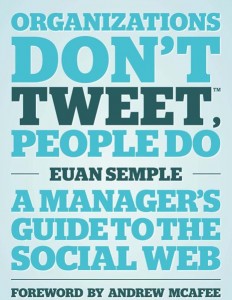
Euan Semple is one of the best bloggers on social software, and following from his work with the BBC a few years ago, he understands the frustrations of trying to implement new ways of working within corporate structures. Organisations Don’t Tweet… is a great introductory work, in which nonetheless I found loads of nuggets of inspiration and learning – as well as a few reminders of things I ought to know but had forgotten. Buy this book for your boss!

PermalinkSome recent dead tree reading

Thursday, 2 February, 2012

An online conference for online stuff

Here’s my latest wheeze: an entirely online conference to discuss digital government stuff. It’ll be free too.

Here’s how things will run. There will be two sessions per day, three days a week over 2 weeks – so 12 in total. Right now I am thinking this will be between 7th and 18th May.

Topics under discussion will be stuff like:

  • Open data and why it matters for government
  • Making participation convenient for participants
  • Developing a strategy for digital engagement
  • How engaging with communities online can help government
  • Using social media in crisis situations

The sessions will go live at a certain time, and you’ll be able to watch a video or presentation from the speaker, and then discuss the topic using comments afterwards.

Once the session has gone live, you’ll be able to access and comment whenever you feel like it – although the speaker will only be guaranteed to be around for an hour or two after the session initially goes live (they may well choose to check in now and again after that, though!).

There will also be Twitter chat and so on involved too – in fact pulling together as many online resources as possible.

Obviously, it won’t be perfect – you could spend a lot of money developing a fully interactive online conferencing platform. But this will hopefully work well enough using freely available tools and a bit of WordPress hackery.

Any thoughts?

PermalinkAn online conference for online stuff