Friday, 19 March, 2010

A digital engagement glossary

DictionaryThis glossary of social media and digital engagement terms comes from a recent piece of my strategy work. It’s skewed towards the government sector, in terms of language and examples. Feel free to use any of this that might be useful for other purposes. Or to challenge my definitions. Or, perhaps, to add glaring things I’ve missed. There are probably no definitive answers to some of these, but I hope you find them interesting and thought-provoking.

Blog: Derived from “Web log” – originally a regularly-updated journal on which visitors (and the original author) could leave comments. Now generally used for a site (or section of a larger site) where text-based content can be created in the form of short articles, almost always open for comments to be posted. These comments may be subject to some degree of moderation.

Campaign site: Website created in association with a specific promotional campaign; usually for a defined period of time; may include facilities to receive user feedback and present an opportunity for engagement.

Commentable document: A facility for hosting a document under review, usually divided into manageable sections, and permitting comments to be left for the author – and to permit dialogue between commenters. Combines some of the features of a wiki for collaborative working, but retaining an initial document structure throughout. Has been used on a number of government policy documents made available for digital consultation. One tool that delivers this functionality (an implementation of WordPress) is Commentariat. e.g. http://interactive.bis.gov.uk/lowcarbon

Content-based networking sites: e.g. YouTube, Vimeo, Flickr, TripAdvisor – sites based on content of a certain type (e.g. video, images, reviews) with a strong element of user feedback, user-generated content (UGC) and elements of social networking (e.g. ability to create groups, forums, favourites, peer-to-peer relationships etc.)

Crowdsourcing: The use of digital (or other) media to allow the contribution of information or ideas from a wide range of people, usually around a topic, a question, or a request for innovative suggestions.

Dashboard: a utility that searches and aggregates information from many channels across the internet, and displays it all in one place, in real time, for management, monitoring or consumption purposes. Example: www.netvibes.com/socialcare

Digital engagement: The use of interactive techniques to improve service delivery and information provision via digital media technology.

Email subscription: Although not ‘social’ in terms of community formation and peer-to-peer interaction, allowing users to register email addresses to receive personal(ised) updates represents a form of digital engagement. Digital tools build a two-way relationship: the user receiving content, and also experiencing some sense of being part of a community, even as information recipient.

Forum: Area for registered members to discuss specific topics. Can form part of a wider overall site. Characterised by a core user base making multiple contributions and often sharing relationships or culture. Forum content may or not be moderated.

Group: A type of forum generated by users within a social networking or similar type of site. Shares many of the characteristics of a forum, but can be more volatile. Members (who are a subset of the members of a larger form or social network) will typically interact for a shorter period of time, usually around a specific single issue. Creation of fan pages (or similar designations) also effectively forms a Group.

Metadata: Information about information. Often invisible to the user, metadata allows content to be classified, structured and sorted. Tags represent a use of metadata.

Microblogging: e.g. Twitter, Identi.ca, Yammer (the latter within corporate environments). Member communities sharing short message content, openly and by direct peer-to-peer message. Highly flexible in their use, and prone to rapid escalation of issues: creation of “a Twittermob”.

Moderation: Editorial judgement over or control of user-generated online content. Numerous varieties exist, from moderation by peers or by the site owner/author, to outsourced arrangements where professional moderators assess and process comments on a larger scale.

Post: To publish content to a blog, micro-blog, forum or website, either as a new topic or as a comment on existing content. Also, as a noun, to describe the content posted (synonymous with ‘blog post’, ‘forum post’ etc.).

Private social networking site: A social network intended for a specific community of interest. Offers similar features to an open social networking site, but almost always sets conditions and controls over entry and participation. E.g. sites set up using Ning.

User-generated content: Any content provided by users, rather than the owners of an online environment. May or may not be moderated (see above)

User feedback: A specific type of user-generated content: that created as a response to provided informational content. Can take the form of freeform text comments, ‘votes’, likes/dislikes, or more detailed survey-type information.

Social bookmarking: A method by which people can store, organize, search and share articles, blog posts and other information. There are many different libraries, each with their own bookmark, including Digg, de.lici.ous and Reddit. Increasingly, posting content links as tweets or to Facebook profiles provides a common form of bookmarking.

Social marketing: The use of marketing techniques to achieve desired social outcomes (e.g. behaviour change). May or may not involve the use of social media. Included here to avoid confusion with social media marketing.

Social media: Digital tools that permit people and organisations to interact freely with low (or no) barriers to entering a conversation. The nature of the relationships between social media users is often as important as the content they share – the ‘social’ aspect is very important.

Social media marketing: The use of social media to promote a particular cause or product. May or may not have social marketing implications. Included here to avoid confusion with social marketing.

Social networking site: A website offering general-purpose networking features to all who may want to join. Facebook dominates the adult market; Bebo has a focus on a younger/teenage audience; MySpace is now focused on music/video content and may be regarded as a content-based networking site, albeit one with a high membership.

Tags: Keywords describing online information that allow other users to search for relevant information.

Twitter: The best known of the micro-blogging platforms. Users contribute short messages, either on the twitter.com website, or using a number of third-party ‘client’ applications: whatever the route, interaction happens in a consistent and open way. Terms include:
Tweet: to post content (short messages up to 140 characters long)
Re-tweet: to republish another’s post. Good for spreading messages widely, or adding commentary to them
Hashtags: words or phrases preceded by ‘#’. This allows them to be grouped together and easily searched.

Webchat: A structured discussion using instant messaging to a host, who then responds. Usually moderated.
Example: http://webchat.number10.gov.uk

Wiki: An open collaboration environment in which users may freely (or with some controls) create and modify content as a community. The best known example is Wikipedia, where an open community collaborates to create an encyclopaedia, but wikis can be used for tasks as varied as communal creation of a policy document, or managing the names and interests of attendees to an event.


Dave writes… Paul Clarke is a very nice man who is also very clever and good at lots of things. He blogs at honestlyreal where a version of this post previously appeared. You’ll find him on Twitter – @paul_clarke. He’ll also be coming to the Learning Pool conference on 12th May to take a few photos and join in the conversations.

PermalinkA digital engagement glossary

Thursday, 18 March, 2010

Bookmarks for March 16th through March 18th

I find this stuff so that you don’t have to.

You can find all my bookmarks on Delicious. There is also even more stuff on my shared Google Reader page.

You can also see all the videos I think are worth watching at my video scrapbook.

PermalinkBookmarks for March 16th through March 18th

Wednesday, 17 March, 2010

Social media resources for Local Government

A flurry of activity around social media this week from our chums at the Improvement and Development Agency.

Local by Social

The first thing is Local by Social, a rewriting of the excellent Social by Social by Andy Gibson. As the IDeA website states:

Social media is changing the world in which we work, socialise and govern. From Twitter to eBay, Facebook to YouTube, new tools are emerging every year that place the connecting power of the internet in the hands of every one of us.

In this context, the expectations on councils to engage, work openly, be accountable and move more quickly on issues are growing. Meanwhile, councils are facing the biggest cuts in spending in the post-war period and are being asked to do more with less just as demands from local people are rising. Higher expectations combined with drastically fewer resources make the imperative to innovate critical. A new set of tools is needed to meet this challenge.

This document outlines how local authorities can use social media to achieve more for less. It also highlights the risk to councils if they ignore the technological advances of social media and the people using them.

Download the guide here (PDF warning).

Backing up this work is a set of three case studies from local authorities, which have been published on Work Together – a prototype social site for the sharing of good practice in local government, focused on partnership working.

The case studies are:

Do visit the site, read or download the case studies, and make sure you leave your thoughts, or ask questions, in the comments!

Massive props to Ingrid Koehler for driving this agenda forward with IDeA; Steve Dale, who is managing the development of the Communities of Practice and the new Knowledge Hub (more on that soon); and Romilly Rogers, who looks after Work Together.

PermalinkSocial media resources for Local Government

Tuesday, 16 March, 2010

Bookmarks for March 13th through March 15th

I find this stuff so that you don’t have to.

You can find all my bookmarks on Delicious. There is also even more stuff on my shared Google Reader page.

You can also see all the videos I think are worth watching at my video scrapbook.

PermalinkBookmarks for March 13th through March 15th

Monday, 15 March, 2010

Why chief executives should blog

I was delighted to have the opportunity to interview Mark Lloyd, Chief Executive of Cambridgeshire County Council, recently.

Since taking up his post, Mark has written a prolific internal blog about his work at the Council to inform and engage with his colleagues at all levels of the organisation.

This is exactly the sort of thing I have been talking about for the last couple of months – that really effective use of social media behind the firewall should be a priority for local councils. Mark’s experiences should hopefully encourage more of this activity across local government.

http://www.youtube.com/watch?v=AAOQ1Pnr36M

Many thanks to Michele Ide-Smith for arranging this interview.

I’m keen to do more videos like this – if you or someone you know would make a good subject, do get in touch!

PermalinkWhy chief executives should blog

Sunday, 14 March, 2010

Big conference

Social Media World Forum Europe

On Monday (14th) I will be attending the Social Media World Forum Europe conference, at London’s Olympia venue. It looks like quite a big do.

I’m also going to appear on a couple of panels, one in the morning and one in the afternoon.

The morning’s panel – at 10:30 – is a workshop on ‘What are Politicians doing in Web 2.0?’ focusing in on:

  • What tools Obama and his team used to gain success in social media space
  • Who’s tweeting?
  • Number 10 – how the prime minister’s office are embracing social media

I’ll be sharing a stage with Paul Staines (aka Guido Fawkes), Scott Redding of the Green Party and my good pal Simon Dickson off of Puffbox.

In the afternoon – at about 5pm –  I’ll be discussing the use of social tools behind the firewall as part of the Enterprise Social Media Forum, in a session called ‘The integration of social business software with Social Media feedback to building your business and brand’.

With me on the panel will be luminaries of the enterprise 2.0 scene David Terrar, Andy McLoughlin and Per Rombouts.

Other sessions I’ve spotted featuring friends of DavePress are Ingrid Koehler, who will be on a workshop panel discussing the impact of social media on elections, at about 11am, and Jemima Gibbons, who is discussing how to write the case for using online communities in business, sometime in the morning (it’s not quite clear on the agenda – PDF warning).

PermalinkBig conference

Saturday, 13 March, 2010

Bookmarks for March 8th through March 13th

I find this stuff so that you don’t have to.

You can find all my bookmarks on Delicious. There is also even more stuff on my shared Google Reader page.

You can also see all the videos I think are worth watching at my video scrapbook.

PermalinkBookmarks for March 8th through March 13th

Tuesday, 9 March, 2010

Transformed by you

Optimus PrimeSimon Wakeman has blogged about the upcoming Transformed by You event in Medway, jointly organised by Medway Council and Kent County Council.

It’s a cross between LocalGovCamp and SIcamp, and looks like it will be a really cool day. Not least because of the involvement of Simon and also Kent’s Noel Hatch – two real innovators and thinker-doers in local government.

Uservoice forum has been set up to canvas ideas for how people’s local areas in Kent could be improved – perhaps by using the internet, perhaps not. You can then vote on the ideas you think will work best, and the top ones will be taken forward on the day, where they will be discussed and where real life geeks will put some prototypes together.

Simon writes:

Public sector organisations face growing pressures to deliver bigger and better services with far less money. Kent County Council and Medway Council recognise that by tapping into local creative thinkers they could go someway to resolve some of the issues that are emerging.

Digital technologies are effective at doing just this. More people are talking and sharing ideas online in ways that weren’t possible before. Technology also provides opportunities for individuals, businesses and other groups to create innovative models to meet these new demands.

You can sign up for a ticket for Transformed by You on the Eventbrite page. There is also a Ning site with some conversations and further information on it and the opportunity for some pre-event networking.

I’ll be there, and I think it’s going to be a very interesting and productive day.

PermalinkTransformed by you

SnapGroups

I don’t seem to write much about new tools very often, which is a shame, as playing with stuff is one of my favourite things in the world. Anyway, here’s one I cam across this morning.

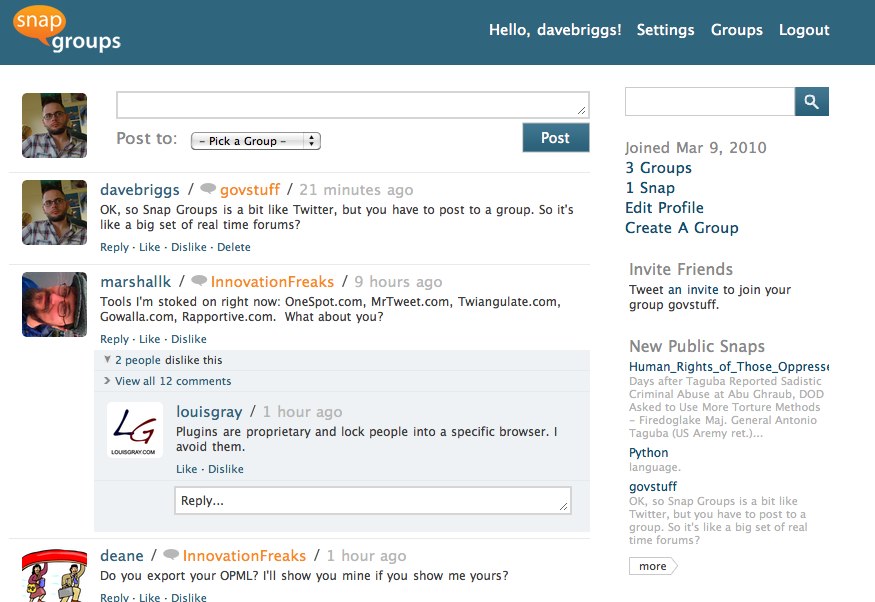
I was alerted to SnapGroups thanks to ReadWriteWeb. It’s a neat little service that mashes up real time status updates – in other words, Twitter – with traditional forums.

So, rather than just posting your message out into the big list of what everyone is writing, instead, you post to specific groups, which either you have created, or where you join one created by others. You can’t, as far as I can tell, post one message to more than one group. Probably good for spammy reasons, but it could get annoying if something you have to say is relevant to several groups of people.

My SnapGroups profile is here, and I created a group called govstuff here to have a play. Feel free to join in!

So SnapGroups is pretty neat, but probably not, to my mind, sufficiently better than what is already out there to disrupt people’s established patterns of behaviour, which is to go to Twitter.

However, the guy behind the service, Mark Fletcher, has some serious background – he built the software that turned into Yahoo! Groups, and was also responsible for Bloglines before Ask bought it a few years ago. So maybe there is more to this – I’ll certainly be keeping an eye on it.

PermalinkSnapGroups

Monday, 8 March, 2010

Find what I’m reading

I’m still having a couple of technical problems here getting my delicious bookmarks posted up to the blog.

Just in case this is causing you a great deal of anguish – and I completely understand if it isn’t – you can find out what stuff I think is worth reading in two places:

  • there’s my delicious page itself, which also of cause has its own feed
  • and I have just started sharing things in Google Reader, and you can find all these items on my public page – which, again, has a feed as well

Hopefully normal service will be resumed soon.

Update: This should now be fixed. The issue was, I think, with Delicious blocking access to the RSS feed – presumably they didn’t like me checking it automatically every hour to see if there was anything new there. By piping the Delicious feed through Feedburner, the problem is averted.

PermalinkFind what I’m reading

LocalGovCamp London

Thursday’s LocalGovCamp in London was superbly organised by Anke Holst and her team.

I was involved in one session, which was to by about internet culture and whether that’s the interesting thing local government ought to be taking on board, rather than stressing about whether or not they should be using Twitter.

The Kulture Show

Flickr credit: Arun Marsh

Rather than just have me drone on for 45 minutes, I thought it would be more interesting to get some views from elsewhere, so I persuaded Huddle’s Kunal Contractor, IDeA’s Ingrid Koehler, and Microsoft’s Dave Coplin to join in for a bit of panel-type session.

It went pretty well, I think it had a different feel to a lot of the other discussions that I’ve been involved in at unconferences. There was plenty of interest and contributions from those in the ‘audience’, which was really nice.

Afterwards, David Wilcox grabbed us all for a chat, in his usual social reportery way:

http://qik.com/video/5272643

There has been a great deal of discussion about the event, on Twitter and on blogs, etc – SocialMention has it all covered.

PermalinkLocalGovCamp London

Adventures in open source land

UbuntuI had a load of fun yesterday being a total geek and installing Ubuntu on a netbook I’ve have for a little while and which doesn’t get used an awful lot. It’s a Samsung NC10, which, as I mentioned in this post, is a nice machine for social reporting due to its small size and light weight. Since I got the Macbook Air, though, I’ve tended to use that for general laptop use and for reporting at events – leaving the NC10 sat on the shelf.

I’ve wanted a Linux based machine for a few months just to play with, really. For the uninitiated, Linux is an open source operating system – in other words a replacement for Windows, or Mac OSX. It’s the bit of software that makes all the boring stuff work behind the scenes, and provides the launchpad for the applications on your computer to do their stuff, like surfing the web, or writing documents, or editing photos.

Now, Linux comes in many different flavours. Some you have to pay for, others you don’t. There’s Fedora, or Mandriva, or Suse, or Debian, or many, many others. I chose Ubuntu as it is one of the free (as in beer) ones, and because it seems to be one of the most accessible – ie it’s easy to install and easy to use. I do think that the plethora of choices is probably something that holds people back from trying Linux though. It’s a bit like trying to choose what to drink in a coffee shop!

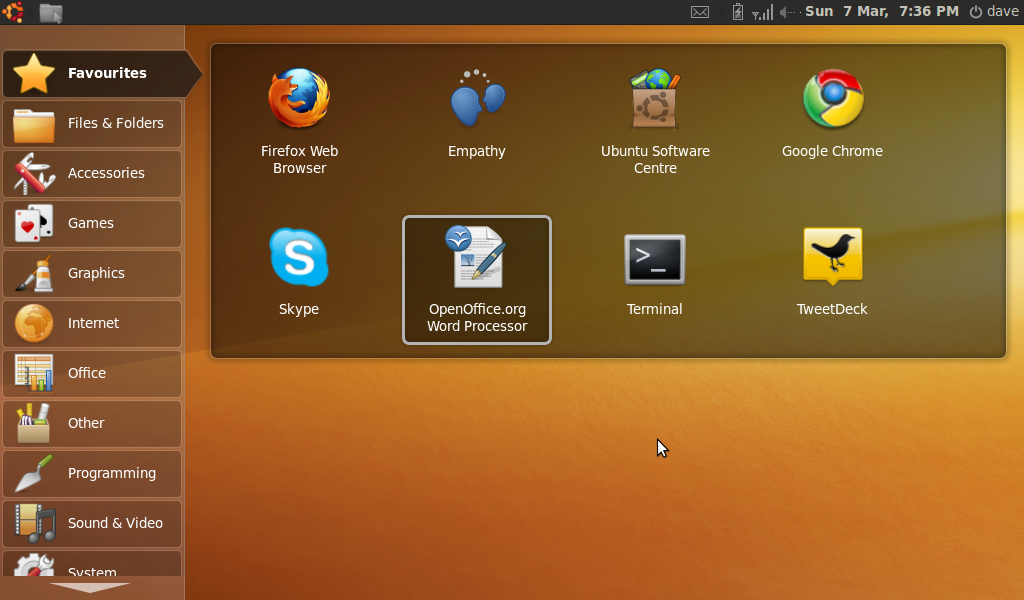
Even better, there’s a sub-flavour of Ubuntu known as Netbook Remix, especially designed for use on small and slow laptops like the NC10. As you can see from the image above, open source doesn’t mean you lose out on eye candy – it’s a lovely looking system, with a netbook-friendly user interface that’s dead simple to use.

Installing it wasn’t too hard in the end, though I did run into problems. This is because the NC10 lacks a CD or DVD drive, meaning I had to install via a USB stick. I downloaded the Ubuntu software as an ISO file (which you would normally burn to a CD), then had to download another bit of software, recommended by Matt Jukes, called Unetbootin. This allowed me to ‘burn’ the ISO file to a USB stick. The next job was to tell the NC10 to boot from this USB stick – rather than the internal hard drive – when I restarted the machine. This proved tricky, and only worked when I completely removed the hard drive from the priority list of devices to boot from.

After I fixed that, though, installation was pain free, and the computer attached itself quite happily to my home wireless network – which was something I feared might go wrong. Other stuff like the built in webcam and microphone worked fine too, which was great.

Once Ubuntu was installed, it was a case of finding what extra software was needed to be added. Ubuntu comes with a great range of open source software out of the box, with everything most people would need, from Firefox for web browsing, Evolution as an email client, OpenOffice.org for productivity stuff etc etc. Indeed, the whole idea of netbooks is of course that you use web based tools as much as possible, so having lots of software installed on the system is kind of missing the point.

Point missing being a stock in trade of mine, I set about adding a bunch of tools to the computer. This can either be very simple, or a bit tricky. There are two ways you can do it simply: first by using the Ubuntu software centre to add open source software to the computer. This is great – you literally just search for what you want, and then in a couple of clicks, it is installed and ready to use. Some software isn’t available from the centre, but is still easy to install, usually just by downloading and running a package from the relevant website.

The tricky bit is when the software you want to install contains propriatory elements, and so doesn’t qualify to be a part of the Ubuntu software centre. I found this with Skype, and to install this, I had to get my hands dirty by using the command line – quite a strange experience in 2010 (I know there is a terminal available in Mac OSX, but I have never found the need to use it). However, one of the strengths of the open source community is the huge amount of documentation available, and Ubuntu is no exception. The support is generally excellent, and these beginners’ problems are covered in depth.

The extra software I have installed includes:

  • Google’s Chrome browser
  • Skype for voice-over-IP calls
  • Filezilla – FTP client
  • Dropbox for online file sharing across all my computers
  • Liferea – an RSS reader which can sync with Google Reader. This seemed to struggle with my subscription list though – perhaps due to a lack of processing grunt and memory on the NC10
  • Tweetdeck – which also needed Adobe Air installing first, which was another command line pain. Like Liferea, Tweetdeck ran quite slowly on the NC10, so I gave it up for a web based client
  • The GIMP for image editing
  • Quanta Plus for HTML and PHP editing

Overall, I’m pretty pleased with the results. This will have breathed a bit of new life into a machine I had little use for before, and it has been an interesting experience to find out how easy it is to use Linux based software. In many ways the operating system argument is irrelevant these days as more and more services are made available in the cloud. This is certainly the aim for Google, whose Chrome operating system will do little more than connect people to the web through a browser. But it is nice to know that you don’t need to have a high spec computer, or a load of expensive software, to have a mostly easy to use, and very nice to look at, computing experience.

Big thanks to Matt Jukes, Mark O’Neill, Harry Harrold, Tony Malloy, David Wenban, Adam McGreggor and others for their Twitter support throughout this process!

PermalinkAdventures in open source land

Sunday, 7 March, 2010

Whoopsie

Apologies if you have been confronted by a nonsensical post full of error messages from this site – something went wrong with my automated bookmark posting thingumy.

Anyway, hopefully it won’t happen again.

Update: it happened again. Sorry.

PermalinkWhoopsie

Saturday, 6 March, 2010

The Community Roundtable

I hadn’t come across this before, but the Community Roundtable looks like quite a useful resource. It describes itself as

a virtual table where social media and community practitioners gather to meet, discuss challenges, celebrate successes, and hear from experts.

…which sounds rather fun.

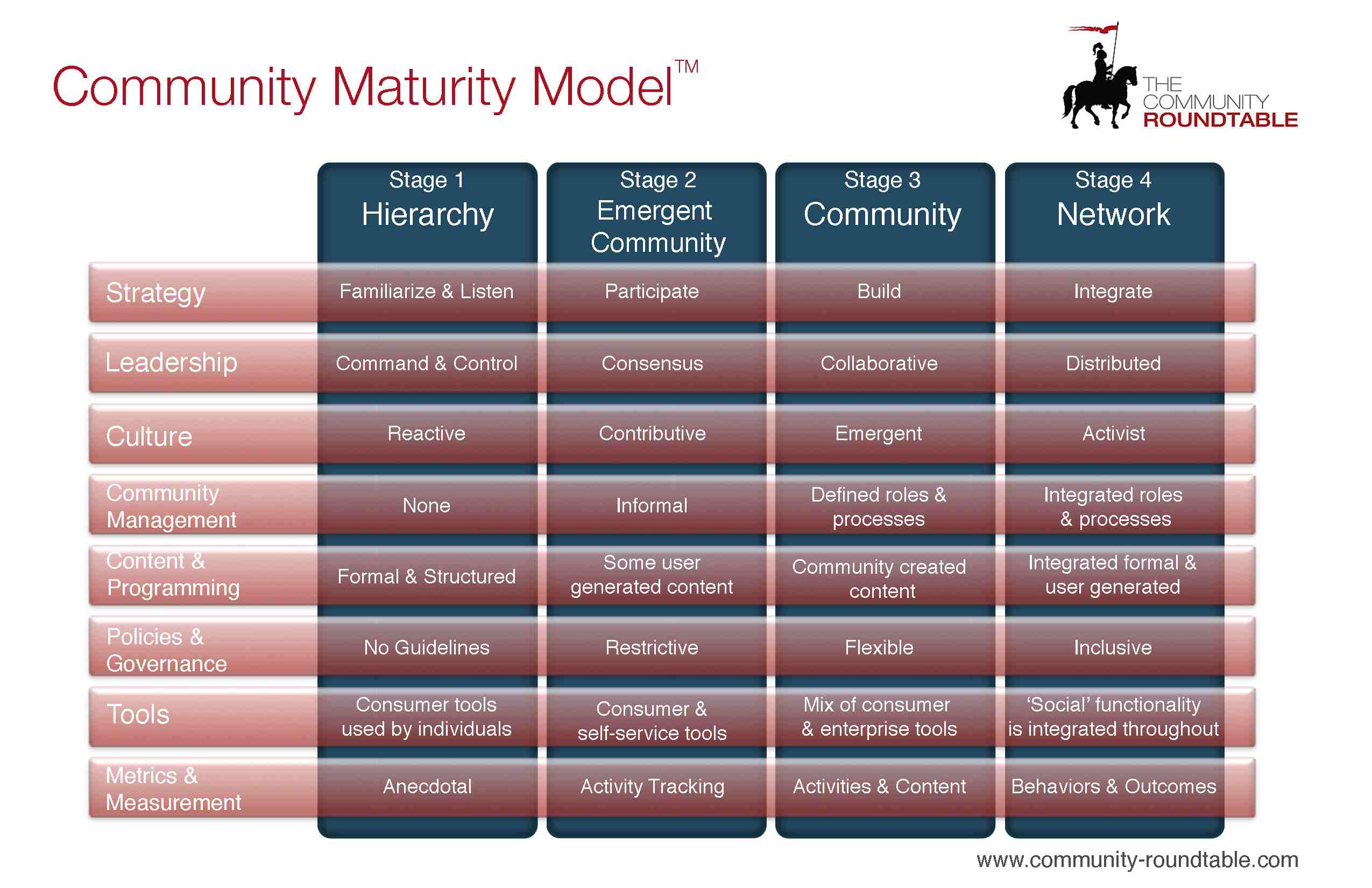
Two things on the site caught my eye this afternoon. First is the community maturity model, an attempt to craft some standards around the role of community management. I tend to eschew things like this as unnecessarily complicating something that ought to be really simple – but there’s always value in sharing ideas, as long as it isn’t in a prescriptive way.

Here’s the model, anyhow (click for a bigger one):

The second thing is ‘The State of Community Management‘ report, which is full of good practice and whatnot. Well worth a download (warning: you have to give up some personal info to get the report).

Community management is a skill required within any team using social tools, whether within an organisation or as part of some external engagement activity. It might not necessarily be a job in itself, but the simple art of making people comfortable and welcome, and encouraging activity and participation is one that is vital for success.

Any time I post about community management, I have to urge people to subscribe to Rich Millington’s blog. Also, read Jono’s book (disclosure – that’s an Amazon affiliate link, and I might make a few pence if you buy anything having clicked it).

PermalinkThe Community Roundtable

Friday, 5 March, 2010

Bookmarks for March 1st through March 5th

I find this stuff so that you don’t have to.

You can find all my bookmarks on Delicious.

You can also see all the videos I think are worth watching at my video scrapbook.

PermalinkBookmarks for March 1st through March 5th

Wednesday, 3 March, 2010

How to be an everyday innovator

PlugsAlongside watching James Graham Gardner’s book on innovation develop online, I was reminded recently about the concept of ‘everyday innovation’ – making innovation something that we all do in our day jobs, rather than something mystical and abstract which is done by pointy-heads in research labs (and alternatively, as more than something as meaninglessly fluffy as a bit of random brainstorming).

In as much as the stuff my team does is ‘innovative’ in a low-key, process-oriented kind of way, I thought I’d describe how we go about it. There’s really not a great deal to it.

1. Gather stuff

Read lots about the work and experiences of people in similar fields to you (for me, government webbies), parallel fields (government non-webbies; webbies outside of government; supplier blogs; technology magazines) and totally different fields (random New York bloggers; lifehackers; science bloggers).

Use tools like Delicious, Instapaper and starred items/favourites in Twitter and Google Reader to keep track of interesting ideas, technologies and individuals. For example, I tag interesting WordPress plug-ins, themes, projects and people so I can find them when I need them.

Go to events (like UK GovWeb Barcamp, TeaCamp, gov 2.0 conferences) and make time to talk to people who work in interesting fields, even if there’s not an immediate project on the table to work on. My first professional WordPress project, the commentable version of Innovation Nation, came out of a chance coffee with Glyn from Open Rights Group about their use of the tool. Of course, there’s a small risk of developing a reputation as a time-waster here, so be up front about your interest and whether you’re just interested or want specific help.

Play (briefly) with new tools you come across. Get a sense of whether they’re useful yet, whether they’re good value and how they might be used. Most tend to be free, after all, so try them for 10 minutes and see what you get out of them.

Bottom line: have plenty of links, tools and contacts floating around ready to use.

2. Connect things together in a new way

Take something you’ve gathered – maybe a tool, a contact or an approach – and see how it would fit into one of the projects that lands on your desk:

Build in analytics and measures to help you track the success or otherwise of the new approach – Google Analytics, Bit.ly stats, or some manual work to benchmark before and after mentions/downloads/perceptions and feedback from the people involved. When you’re innovating, it’s not just about the output – whether the process itself worked is a valuable learning too.

Think about the risks involved too and what you can do about them. What if it doesn’t work? (Fall back to the traditional way of doing it). What if we get overwhelmed with feedback? (Great problem to have! Anyway, in that unlikely event, there are people who can help) But it’s not accessible! (Do your best, and have good, accessible alternative content in place. If it takes off and you start using the approach regularly, you can make it more fully accessible in due course).

Bottom line: take a real world project, try doing it with a new tool or technique. See if it works better or worse than the normal way. Have answers to people who ask you about the risks involved.

3. Share it widely

On the face of it, this looks like the hardest part, in that projects that don’t work or seem risky are potential bad news stories that won’t do much for your credibility. Personally, I’ve hardly ever encountered resistance to talking about the things we’ve tried or negativity when I’ve done so, though to be honest I usually try to couch the less successful results in context of some positives too. Being human, I sometimes don’t bother writing – even though I should – about the most dismal failures. But without talking about your approach and its results, I’d argue you’re not really innovating – to do that, you have to provide something others can see, learn from and build on.

Blog and tweet about it. Take screenshots and present them as warts-and-all case studies at events. Volunteer to run seminars internally and externally to share your learnings. If you can, release what you’ve done in a form and with a licence others can re-use – especially if it’s code or a methodology. Sure, it takes time, but not only will others get something, you’ll benefit from the feedback and improvements people suggest.

Bottom line: make an effort to communicate what you did, how, and what you learned. Be frank and open, but above all, be shameless.

Steph works in digital communications in central government and blogs at http://blog.helpfultechnology.com

Photo credit: Eisenrah

PermalinkHow to be an everyday innovator

Tuesday, 2 March, 2010

Join the public sector learning community

Learning Pool’s annual conference is on 12th May, in London, and it promises to be a really great day. You can have a sneak peak of the agenda here (PDF warning).

One of the speakers I am really looking forward to hearing from is Rob Whiteman, who will be just about to take up his new job as head honcho at IDeA when he takes the stage. It will be really interesting to find out his views on how local government can meet the many challenges it faces at the moment.

Another highlight will no doubt be my double act with Cllr Tim Cheetham.

Don’t forget to take a look at our conference community, where you can connect with other people interested in learning and technology within the public sector. Even if you can’t make the conference, it would be great to have your online involvement.

PermalinkJoin the public sector learning community

Likeminds

Dave and Mary at Likeminds
Learning Pool's Mary McKenna and me at Likeminds - photo by Paul Clarke

I had an enjoyable time at the Likeminds conference in Exeter yesterday (Friday 26th Feb). Before I start going on about the content of the event, I really ought to praise the organisers for the amazingly smooth way the event ran – it really was superbly run. One great innovation was the lunchtime sessions – focused conversations on a topic facilitated by an expert. I attended Lloyd Davis‘ lunch on cloud culture, which a lot of fun and on which I blogged earlier.

It was a little more marketing focused than the events I usually attend, which provided a different perspective on things – albeit not a perspective I was always terribly comfortable with.

I’ve never worked in communications, or PR, or marketing, or anything like that. I’ve certainly never used the word ‘brand’ in a sensible conversation, as far as I am aware. I’m sure all of this activity and discussion is vital, though, it’s just not one I feel I can really contribute to in a meaningful way.

What was interesting for me was the impression I got that, in some ways, the debate around the use of the internet to increase engagement, and the effect it has on organisations’ working culture, within the public sector might be slightly more mature than in the private sector. I could be wrong, and it could just have been because I was at an event focused on marketing and PR, but an awful lot of the conversation in government about this stuff is focused on issues other than how it affects external comms issues.

Public-i‘s Catherine Howe – who I was delighted to meet in real life for the first time –  really summed this up well in her post about the event:

Here it is – I do not want us to miss the enormous opportunity that the social web affords us to make social change by losing it in a miasma of attempts to sell stuff to each other.  I do not want to talk about marketing and how brands can influence people – I want to talk about people having more power over the world around them.  I don’t want to talk about social communications – I want to talk about fundamental culture change and how we can influence it.

This is a much more articulate way of describing something I mentioned recently:

…while the internet is undoubtedly important for communications, it’s a mistake to put all of this stuff in a box marked comms and assume it doesn’t affect or benefit other parts of the organisation and the way they work.

Organisations of any description have an awful lot more to learn from the culture of the internet than just how to either sell stuff or get people to like the stuff they do. The lessons that the internet teaches us are around the way being more transparent and cooperative in the way we do things is a more effective way of working. I’m repeating myself, I know.

Back to Likeminds. Jonathan Akwue from Digital Public gave one of the best talks, and it was the first one on the day, too. I grabbed it on my trusty Zi8:

PermalinkLikeminds

Monday, 1 March, 2010

Clouds and culture

CloudsLloyd Davis is a lovely man, and a very clever one at that. He founded the Tuttle Club, a weekly networkingy sort of meetup for people who like the internet and other people, which is at the same time very simple but also rather ingenious.

He also sports an even more ludicrous job title than mine, for at least a part of his time – he is Social Artist in Residence at the University of London’s Centre for Creative Collaboration. What does that mean? Mary has a go at explaining here. I’ve written a bit about social artists, as has David Wilcox.

Lloyd ran a couple of sessions at last week’s Likeminds conference – he facilitated a panel session; and hosted a lunchtime discussion, which I attended, on ‘cloud culture’. This is a topic he has written about on his blog, and which has been the focus of quite a bit of attention from such luminaries as Charles Leadbeater.

I found it a really interesting topic for discussion, and I’m grateful to Lloyd – and the organisers of the conference – for creating a space where I was made to think about it properly. There are, of course, many aspects of our culture that are affected by the internet, and use of the cloud in particular.

There is the issue of cultural ‘stuff’ or products, like stories, music, films, art etc. Traditionally hosted by museums or galleries, or publishers; what effect will be had by this hosting now being performed by Amazon, or Apple, or Google?

The case of the music industry is particularly interesting, of course. People have been making music for thousands of years. Record labels have existed for a handful of decades. You don’t need the latter to make the former possible. Artists don’t need bigorgs to distribute their work any more – get over it.

There are other types of culture too. What about national culture, in the age of the internet and globilisation? If all our culture is online, in the cloud, what effect does that have on who we think we are?

One of my main interests is organisational culture, classically defined as ‘the way we do things around here’. This is an area where the effect of the internet is probably most measurable. It’s also true of course that the internet itself has a culture. What lessons can organisations learn from this internet culture?

This goes back to my constantly repeated point that the interesting thing about the use of online technology is not the technology but the implications of using it. Internet culture is open, it’s cooperative, it’s funny, it’s transparent. These are the things we should be pushing our government to be.

What I like are examples of offline activity that wouldn’t be possible without the internet. Tuttle is one of those. On the face of it, it’s an old school networking meetup. The truth is, though, is that it’s an old school networking meetup that’s been filtered through the internet and its culture. Most of those who attend know each other virtually, introductions tend to go along the lines of “oh, so you’re [insert twitter username]”.

GovCamp is another example. So we met in real life, and the agenda was put together with post its on a big blank bit of paper. But how was it that so many people were convinced to give up their Saturday’s to come and talk about government? It’s because of the internet culture of openness, transparency, collaboration and the democratisation of publishing. Just as anyone can publish online, whether with a blog or whatever, anyone can speak at an unconference.

As I mentioned earlier today, I’m hoping to run a session at this week’s London LocalGovCamp about what lessons internet culture can teach local authorities, and other public sector organisations. Anyone who is coming to the event, please do come along and join in. Those that aren’t, I’d appreciate any comments.

Here’s a video where Lloyd talks about his stuff:

PermalinkClouds and culture

Yet more gadding about

Boarding at last

Another busy week, this one.

On Wednesday, Learning Pool are hosting another local government breakfast meeting, at Coventry City Council’s offices. We’ll have a range of contributors from local authorities, as well as me. Details here – do come if you can.

Thursday is LocalGovCamp day, this time in London. Well done to Anke Holst for organising it all – it promises to be a great day. Mary and I will be there from Learning Pool, and I’m hopefully going to be organising a session around whether councils can feasibly engage with citizens when people within those councils aren’t talking to each other on a regular basis. It’ll be fun, I promise!

Then on Friday, we’ll be hot-footing it back to Learning Pool towers in Derry for the LP Christmas party! Bit belated, but then that should mean we’ll all be well up for it.

PermalinkYet more gadding about