Sunday, 28 December, 2008

Bookmarks for December 21st through December 28th

Stuff I have bookmarked for December 21st through December 28th:

PermalinkBookmarks for December 21st through December 28th

Tom Watson’s Christmas Message

Our Minister for Digital Engagement’s blog has a stark message:

Globalisation in a connected world did for Woolies. When my son is a teenager, his friends will arrange to meet online and share their music tastes before pressing the ‘buy’ button. They’ll discover the world from their shared trust in favourite web sites.

We are entering an era of profound and irreversible change to the way people choose to live their lives and organise the world around them.

And there isn’t a politician on the planet who is going to stop this.

PermalinkTom Watson’s Christmas Message

Links and Twitter

Steve Dale writes about his uneasiness with a new Twitter mashup service, Twitchboard, which automates the posting of content from Twitter to other social web services. At the moment, all it does is links: if you post a URL to Twitter it also gets pinged to your Delicious account.

I may be in the minority here but I feel slightly troubled by apps such as Twitchboard that want to think for me. I’m perfectly happy to create my own bookmarks in Delicious, which are reasonably well organised and categorised, or to click on Stumble! to add a link to a particularly interesting article I’ve read to my Stumble!  These are conscious decisions I’ve made to provide the ’semantic glue’ for my personalised social web. I tend to Tweet about fairly trivial stuff and will occasionally link to an article or picture that I’ve found particularly amusing. I don’t necessarily want to store these links for prosperity, or worse, create my own personal tag cloud around a random stream consciousness.

I can see some of the value, just in terms of time saving, for cross posting links to Delicious from Twitter. But I think Steve is right in this case – having Twitchboard perform this service would make you think twice about what you post to Twitter, and that’s just no fun. Presumably you also still have to go into Delicious to add tags and stuff (which is where most of the benefit lies) – so it isn’t that much of a time saver after all.

I mentioned in a comment on Steve’s post that actually doing this in reverse makes more sense: links I save in Delicious get automatically shared on Twitter. This is fairly easy to get set up, simply by using the RSS feed from my Delicious account and Twitterfeed to parse each link I share into Twitter.

It will be interesting to see how this works…

PermalinkLinks and Twitter

Some Holiday Picks

Photo credit: Ravages

I’ve seen some interesting stuff pop up in my RSS over the last few days – here’s some of them:

  • Shel Holtz has a really interesting post about using Ning as a communication and collaboration platform for projects.
  • BookSprouts is an online community for readers. There are others.
  • MacMod will be a Mac only social network
  • Neville has been having problems with his iPhone. I’m waiting on a call from my local Apple Store for my second replacement. They really are the Alpha Romeo of smartphones.
  • John Self picks his books of 2008.
  • TweeTree is a new service that does what Quotably used to do: put Twitter conversations into a sensible, threaded order.
PermalinkSome Holiday Picks

Saturday, 27 December, 2008

DavePress comments powered by IntenseDebate

I’ve just moved the comments on this blog to the IntenseDebate system. It adds quite a bit of functionality to the comments, including threaded discussions (which are part of the new version 2.7 of WP, but I haven’t upgraded just yet…) and the ability to rate comments as useful or not (assuming you are logged into an IntenseDebate account).

If you have an account, it also means that you can keep a track of the comments you make on other blogs that use the IntenseDebate system, which also produces an RSS feed. The other useful thing for blog owners is that while the comments are hosted by IntenseDebate for the purposes of their services, a mirror of them is still held in your WordPress database, so you switch back to a more traditional way of doing comments without losing anything.

I still think there is an opportunity for a more open way of tracking comments around the web – at the moment the solutions are either tied into everyone using the same service – whether IntenseDebate or something like CoComment – or people doing their own thing, like Steph Gray who tags the blog posts he comments on with a certain keyword in Delicious, the feed from which he then republishes in his blog sidebar.

Anyway, I’d appreciate any feedback you have on my use of Intense Debate here on DavePress.

PermalinkDavePress comments powered by IntenseDebate

Friday, 26 December, 2008

Government spends ‘£16m on media monitoring’?

The Guardian reports that the Conservative Party have unearthed that the spending by the various arms of the UK government on ‘media monitoring’ – ie finding out what people are saying about them – reached the sum of £16 million pounds over the last three years.

Whitehall departments alone spend more than £11m on outside media monitoring companies, including £2.7m in the last financial year.

Quangos including the Arts Council for England, and the Equality and Human Rights Commission, have spent another £2.248m.

The Conservatives pointed to the fact that the government has its own in-house monitoring service, which employs 19 staff and costs £1m a year to run.

The full cost of media monitoring is likely to be even higher, however, because the figures exclude two of the biggest government departments, the Department of Health and the Department of Work and Pensions.

ØThe Conservatives said the two departments refused to provide details of their respective spending because it was deemed to be "commercially sensitive".

That does sound like rather a lot of money to be spending. The quote above does mention COI’s own media monitoring service (see towards the bottom of this page) which I am sure is an awful lot cheaper than commercial alternatives.

Another way of cutting down on this sort of cost, of course, is to make use of monitoring tools on the web. Alright, subscribing to a few Google searches on key terms probably won’t replace the efforts of getting an agency to do it, but it surely would help if individual teams within an organisation are monitoring what people are saying online about their work.

After all, with almost all of the mainstream media now making most of their content available on their websites, I wonder just how much stuff would get missed – assuming you were tracking the right stuff?

PermalinkGovernment spends ‘£16m on media monitoring’?

Tuesday, 23 December, 2008

WordPress and domains

After my posting on WordPress for Good, this page was brought to my attention. It states that:

For various reasons related to our WordPress trademark, we ask if you’re going to start a site about WordPress or related to it that you not use "WordPress" in the domain name. Try using "wp" instead, or another variation. We’re not lawyers, but very good ones tell us we have to do this to preserve our trademark. Also many users have told us they find it confusing.

How utterly lame, and also inconsistent for an open source project. This is one of the few times I feel a bit let down by WordPress.

This reminds me a little of the Firefox logo and name copyright farrago. In my view, you should be open or not. An open source project setting rules on what people can and can’t do with a bunch of letters in a certain order is plain daft, in my view.

I’m leaving WordPress for Good where it is for now.

PermalinkWordPress and domains

Making WordPress into a CMS

As I mentioned earlier, I am going to be running some workshops at the Social Media Exchange, organised by Sound Delivery next month on the topic of ‘WordPress for good’.

The aim of the sessions will be to demonstrate how you can develop a really strong web presence quickly and cheaply using WP – not just as a blog but also as a CMS, to run a small but more traditional looking website.

This is possible due to WordPress’ ability to have static pages as well as blog posts, but more importantly in its amazing flexibility in terms of themes and plugins.

To try and be as helpful as possible, I am building a site to provide some resources for anyone wanting to build a site for their organisation using WordPress – it’s at http://wordpressforgood.com but there isn’t much there at the moment.

I’d like to make sure that I get as much material up there as I can before the event, so that those attending who get suitably enthused have something to get their teeth into straight away.

I’d really like to know what your favourite WordPress-as-a-CMS themes and plugins are so that I can add them to the site – and give you credit too, of course! There are a number of ways you could do this:

Thanks in advance for any pointers you can provide!

PermalinkMaking WordPress into a CMS

Monday, 22 December, 2008

My hopes for 2009

I wouldn’t be so foolish as to try and make some prediction for 2009, as they would be bound to turn out to be hideously wrong within a very short space of time. However, I feel a little safer writing a bit about what I hope will happen in the world of govweb / digital participation:

1. We start to get the most out of communities

I want to see everyone making better use of their networks, and creating new, better ones where they are needed. This can be on or offline, or even better a blend of the two. I’d like to see some real appreciation of the role of the manager, or facilitator of communities and more done to bring together the people that get how it can be done. More talking and more sharing would be very nice!

2. Better risk awareness

Believe it or not, in a previous life I was once the risk management officer for a county council. I think a lot of the talk about risk when it comes to the social web is actually just an excuse not to do things that people might find a little bit frightening. This is most true when it comes to the blocking of social websites on office networks, but it can be applied to a number of areas, whether getting involved in online conversations or becoming properly collaborative organisations. The mature approach to risk is to assess them and manage them – but also to take them. Running away leaves you just as exposed as blundering blindly in.

3. Social reporting as learning

I’m still buzzing about the stuff I wrote about here, inspired by David Wilcox. Like many, I have caught the social reporting bug, and now the connection with networked learning has been made, it makes even more sense to me. I hope we see more and more events, workshops, training sessions and conferences incorporate the creation of online learning spaces to make the sharing of stories and knowledge so much easier.

4. Netbooks for all

I’m really excited by the sudden growth in popularity of these small but (usually) beautiful machines. I now have two: an Asus Eee and a Samsung NC10 – the latter more useful than the former thanks to its bigger screen and keyboard. The small price and size of these computers make them ideal for people who might not otherwise buy a PC, and the fact that they come wireless enabled means more people will be able to access the wonders of the web than would otherwise be possible – especially with all these deals around mobile broadband and the like.

5. Digital mentors for government

I like the idea of digital mentors, obviously, as my involvement with Digitalmentor.org and Voicebox has shown over the last few months. However, I keep going back in my mind to this comment from Tom Watson, which mentioned having folk fulfilling the role of digital mentor for government – in other words, providing the coaching and resources needed to let public servants decide for themselves the tools they want to use. I think a simple mixture of awareness-raising and some practical demonstrations, and perhaps an online peer support community, is all that would be needed to get this off the ground. Maybe something to discuss at January’s barcamp?

So that’s some of the things I am hoping for. What about you?

PermalinkMy hopes for 2009

Barcamp on Ning

The upcoming Barcamp for UK government webby stuff now has a social network, thanks to Ning!

In many ways, this is a copycat …err… following good practice attempt after the excellent network set up by Tim Davies for the UK Youth Online event back in September. Having a more social environment for people to talk to each other before, during and after the event might help foster connections made and help get things done.

Of course, it isn’t to everyone’s taste and those that prefer email can stick with the Google Group and dedicated wiki-ers can use GovHack or the event wiki if they choose to.

I’m overcoming some of the issues I have had with Ning – a lot of the designs are now cleaner than earlier efforts, they are making a good fist (sorry) at getting rid of the ‘adult’ networks, and it’s easy to pull in content from elsewhere. Also, the simple act of paying a bit to get rid of the ads improves things.

So do swing by http://www.ukgovweb.org/ even if you can’t make it on the day to be a part of the conversations around this great event!

PermalinkBarcamp on Ning

Sunday, 21 December, 2008

FixMyStreet on DirectGov!

Tom Watson reports via Twitter that MySociety’s FixMyStreet is now embedded in DirectGov. On the page in question, a boxout gives you the option of reporting a problem via FixMyStreet rather than through the usual route of DirectGov linking you through to your local authority.

An interesting example of making volunteer effort a part of the ‘official’ government offering. I have had some interesting discussions with some local gov folk about how useful FixMyStreet actually is, so it will be fascinating to see how this is received.

PermalinkFixMyStreet on DirectGov!

Putting Citizens First: Transforming Online Government

Paul Canning points us to some remarkably good stuff from government web folk from across the pond in the States: a white paper called Putting Citizens First: Transforming Online Government. Paul writes:

That such a document could exist is solely because webbies in US government are organised and have a voice. ‘Webbies’ meaning professionals with web specific skills, those which have emerged over the past 15-20 years.

It’s language could only come from webbies. We have nothing anywhere close to this document in the UK.

The organisation in question is the Federal Web Managers Council. The vision for this transformation is set out as:

  • Easily find relevant, accurate, and up-to-date information;
  • Understand information the first time they read it;
  • Complete common tasks efficiently;
  • Get the same answer whether they use the web, phone, email, live chat, read a brochure, or visit in-person;
  • Provide feedback and ideas and hear what the government will do with them;
  • Access critical information if they have a disability or aren’t proficient in English.

Paul has reproduced the whole text in his post – it really is required reading.

PermalinkPutting Citizens First: Transforming Online Government

Wednesday, 17 December, 2008

Cloudcamb notes

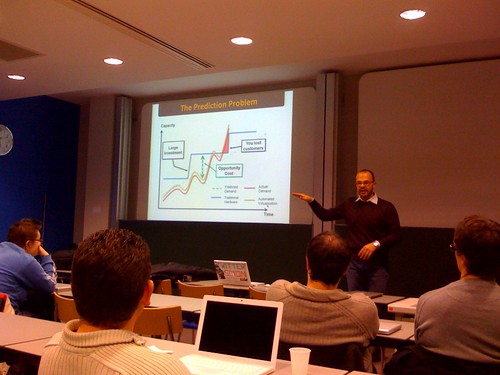
Cloudcamb

Here are the notes I mananged to make at CloudCamb, which was organised jolly well by Matt Wood (MZA on twitter).

Simone Brunozzi, Technical Evangelist, Amazon Web Services (simon on twitter)

Cloud computing helps answer the ‘prediction problem’ – knowing what your tech needs will be in the future

Need to expand to take advantage of an opportunity

What about periodical demand?

Results in extra cost and delays

lack of power and flexibility in infrastructure

Cloud computing allows a business to: focus on your skills, limit cap ex, scale quickly, reliable, innovate and save money

Principles of AWS: cloud computing, easy to use, secure, flexible, on demand, pay per use, self service, platform agnostic

Services: include S3 – storage, EC2 – virtual server, Cloudfront – content delivery, Database – SimpleDB

By end 2007 AWS were using more bandwidth than all Amazon retail sites put together. S3 objects (basically, files hosted) 800m in q3 2003, 29bn q3 2008

Cloud computing suits cloud computing. No upfront investment, cost effective, follow your success, shorter time to market

AMAZON S3 – Smugmug.com saved $500k pa using S3 (ie just by moving storage of files). Scalable online storage, cheap & reliable, simple APIs (REST, SOAP)

AMAZON EC2 – Vitual servers on demand, from $0.10 per hour, Linux, Windows, OpenSolaris all available. Elastic IP , Elastic Block store, availability zones, SLA 99.95% Licences for software can be paid for by the hour. Animoto Feb 08 80 ‘instances’ of EC2. Then launched facebook app went up to over 3500 by April. Would have been impossible to scale like that traditionally.

AMAZON CLOUDFRONT – Improve content delivery through caching. Easy setup, no committment, 8 locations in US, 4 in europe, 2 in Asia. Elastic and reliable. Tiered pricing.

AWS offers: fault tolerance, scalability, rapid innovation possible, no barriers of adoption, better pricing model, no upfront investment, faster time to market, choice, partners

Who uses? NY Times, Nasdaq, Washington Post, Linden Labs, amongst others

Future: operational excellent, security, certification for developers, international expansion, management console, load balance, auto-scaling, monitoring

EC2 now available in europe – though no Windows stuff

Amazon yet to not be able to provide service to a customer

Toby WhiteInkling Software (tow21 on twitter)

Toby is talking about ‘Running a startup in the cloud’

All of Inkling’s servers run on EC2. But cost so far has been more than traditional servers, but that is not what matters. S3 is cheap, EC2 less so.

Ease of use – Inkling have few staff, have better things to do than server admin

Amazon makes process very easy, setting up new instances etc. Scriptable, repeatable and testable. Version controlling of AMIs. Forces you to consider these issues, which is a good thing.

Karim Chine – Computational e-Science in the Cloud: towards a federative and collaborative platform

Karim started by showing just how easy it is to use Amazon EC2. ElasticFox is an FF extension that helps manage the service.

There is a lot of science in this particular talk. I’m not sure I can keep up. It’s something about reproduceable computational results. I think. Just read this, if you want to know more.

Seriously, though, some of the stuff I understood about this show that the ability for people involved in scientific projects to collaborate over the internet in this way is superb, and the technology is clearly pretty innovative, not to mention hugely complicated. Given that I am attending a meeting in a building called the Centre for Mathematical Sciences, I would imagine that a lot of other people here would know a lot more about this than me.

PermalinkCloudcamb notes

The Social Media Exchange

The Social Media Exchange is an event being organised by Jude Habib of Sound Delivery, and is happening on 26 January at the Resource Centre on Holloway Road in London. You can find out more by downloading this PDF.

According to Jude:

The Social Media Exchange is a a series of bitesize masterclasses, practical creative surgeries, discussions, collaboration and networking opportunities for all your multi-media communication needs for 2009. Pick and mix sessions, all in one day.

I’m going to be there, amongst other luminaries such as Steve Bridger and Amy Sample Ward, running a session called ‘WordPress for Good’ – how WP can be used by small voluntary organisations to provide a cheap and easy way of having a really professional and social online presence.

It looks like it will be a really good day. Email socialmediaexchange@sounddelivery.org.uk to book a place.

PermalinkThe Social Media Exchange

5 Different uses for RSS

RSS is a great technology, one of those that underpins the new usefulness of the web. It’s a simple way of keeping in touch with what is happening in lots of different places, without having to keep visiting lots of sites every day.

Here’s a video from those wonderful Common Craft folk explaining RSS better than I ever could:

One of the really fab things about RSS are the different uses to which it can be put. Here’s five off the top of my head – have you any others?

1. Keeping up with bloggers

I don’t think blogging would have taken off nearly as fast as it did without its very early adoption of RSS as a method of syndicating content. Blogs by their nature are updated on a regular basis, and in a lot of cases a lot more often than other more traditional sites. Keeping up with all that content would be impossible without a way of bringing all those updated into one place.

2. News to you

News site soon cottoned onto the potential of RSS, to the point where now any news organisation worth its salt provides content in this way. Other organisations are starting to adopt it as well, and government is getting there. The need to keep eyeballs on adverts has resulted in some feeds containing only teaser content, to force the reader to go to the originating site anyway. This is a Bad Thing, in my view, and the one positive thing that will come out of RSS feeds that include adverts in them is that it might mean we get rid of partial feeds.

3. Monitoring what’s being said

Now that search engines such as Google are providing RSS feeds for their alerts service – as well as Blogsearches – it makes it all the more easy to set up monitoring dashboards, rather like the ones developed by Steph Gray and others at DIUS. Scanning the web for mentions of key names and topics means that nothing on the web needs to be missed, no matter how small the source.

4. Chchchchchanges

Collaborating on wikis, and forums etc is a wonderful way to experience how the web can help bring people together to share and develop content together. But how to know when people have made updates to pages, or projects, or conversations? One way has always been to get email alerts, but that can lead to having a very full inbox. Any web service worth its salt these days provides RSS for updates, meaning you can keep yourself in the know, and well organised at the same time.

5. Republish, repurpose

This is the most exciting, for me. Because RSS is an open standard it means other services can make use of it to republish material in new ways. Take Steph’s digitalgovuk site – all built using the RSS feeds that Delicious spits out – or Simon Dickson’s OnePolitics – which makes following political blogs both easy and easy on the eye. When you start getting into the territory of combining RSS with other technology like maps and so on, the possibilities seem limitless.

What other uses for RSS are there that are important to you?

Permalink5 Different uses for RSS

Tuesday, 16 December, 2008

Barcamp-Teacamp this Thursday (18/12/08)

Teacamps are the rather British regular get togethers for people interested in cool webby stuff in government. They take place every other Thursday at the House of Fraser cafe on Victoria Street.

Turnout has been a little disappointing of late, so I hear – I’m one of those that hasn’t appeared for a few meets – but it would be great to have as many people along as possible this week. For  one, it’s nearly Christmas and it would be good to pass on season’s greetings in person.

Mainly, though, it seems like a really good opportunity to discuss the upcoming Barcamp, which is taking place at the end of January. From what I gather, preparations are progressing nicely, but it would be great for a pre-meet to take place, where folk can talk together about what they are planning to present, or maybe what they would like to see from others.

So, hope to see lots of you there – 2pm, Thursday 18 Dec, House of Fraser cafe.

PermalinkBarcamp-Teacamp this Thursday (18/12/08)

Web based or desktop?

Just recently, I have stopped using the WordPress inbuilt editor, which runs in the web browser, and have started using MarsEdit – a piece of desktop software I have previously been rather unkind about – to write my blog posts. Since getting a PC, just recently I have continued in this offline blogging vein by using Windows Live Writer.

This started me thinking about the ways I use online services – through web based or desktop applications. As always, the first thing I did was to ask my Twitter buddies:

  • Me: What makes you decide whether to use a web app rather than a desktop one? eg webmail vs client, or google reader vs feedemon or netnewswire?
  • Simon Wakeman: functionality functionality functionality…it depends, I use a mix of each, although my multi-PC multi-site work life lends itself to a cloud-based apps (newsgtr excepted)
  • Nick Booth: experimentation or if someone shows me something I like – then I’ll use it.
  • Matt Kelland: web apps are a last resort for me – only if I need collab access to the data AND I know I will always be online when I need it
  • Kevin Campbell-Wright: I’m with Simon Wakeman
  • Steven Tuck: using desktop for things where I want alerts eg twhirl, feeddeemon and web based for portability google docs, email.
  • Andrew Beekan: Accessibility. When it comes to readers and mail I like to be able to access wherever I am. Docs, I use a mix of Office & Zoho.
  • Michael Grimes: Because I can access them easily from anywhere (with an internet connection).

The answer, it appear, is ‘it depends’.

Let’s have a look at some examples of what I use and where.

Email

I use webmail all the time – Gmail in this case using Apps for your domain. However, I have also set up Apple’s Mail client to download my email through IMAP for backup purposes, which I do roughly once a week. The main advantage of using the client application on my desktop is that it works when I’m not online… but that is rarely the case and my iPhone can be used for emails that just can’t wait. So, I’m happy with webmail. Unless anyone wants to convince me otherwise?

News reading

I started out reading RSS feeds late 2004, using Bloglines (Google Reader didn’t even exist in those days…). Then, as a Windows man, I discovered the wonder that is FeedDemon, a desktop application that really is the Rolls Royce of aggregators. When Google Reader came out (for the second time, the first version was rubbish) I toyed with it for a while before returning to FeedDemon.

When I switched to a Mac, I immediately downloaded NetNewsWire, the equivalent to FeedDemon. Sadly, I found that it just wasn’t the same experience, both in terms of ease of use and features. So, I switched to Google Reader, and that was that.

(It’s worth pointing out that both FeedDemon and NetNewsWire are part of the Newsgator family of RSS products, including the online RSS reader. All three sync together, so you could use NNW on a Mac, FD on a PC and NG at a third machine, and all would be up to date with what you have read and what you haven’t. Pretty neat.)

I really got into some of the features of Reader, like sharing items, with and without comments, which get automatically re-reported in FriendFeed. I also have got used to using Google Gears to download an offline copy of my feeds to read on the train. So, am also a web-based man when it comes to RSS. I have, though, just reloaded my latest subscription list into NetNewsWire to give it another go – along with the iPhone app and the fact that I now have a PC with FeedDemon on it – which could convince me to switch back…possibly.

Blog writing

A quicky this as I seem to write about it so much – I prefer writing blog posts offline. It’s irrational in these days of always-on broadband, but I feel rushed using the built in WordPress editor. There’s more on this topic here. On a Mac, the only sensible choice of offline editor is MarsEdit, whose lack of rich text editing is, frankly, a strength. The only time I use the built in editor these days is when I am using a different machine to my MacBook, or if I need to use a lot of bullet points (which are a bit annoying to do in MarsEdit).

Twitter

I use a client for TwitterTwhirl. Others may rant on about the benefits of others, like Tweetdeck (which is big and ugly and horrible in my view) but I have found Twhirl seems to do stuff just the way I’d expect and like it to. Which is more than can be said for the Twitter web interface, on the homepage. The brightest thing Twitter ever did was to outsource its UI, if the website is anything to go by…

Word processing

See blog posting. I just like typing into a desktop app more than a box on a web page. Even when the document I am writing needs to be shared, I’d still rather type it locally first, then upload to Google Docs or whatever. What are your thoughts on the online/offline decision? I’m clearly pretty confused about which I prefer and when!

Which do you prefer – doing everything in the browser, on the desktop or a bit of both?

PermalinkWeb based or desktop?

Monday, 15 December, 2008

Bookmarks for December 7th through December 15th

Stuff I have bookmarked for December 7th through December 15th:

PermalinkBookmarks for December 7th through December 15th