Monday, 15 December, 2008

Video hosting services

Whilst beavering away this week in Stockholm on Cisco08, I had a chance to play with a few different video hosting services, namely YouTube, Vimeo and Blip. Here’s what I found:

YouTube

YouTube was the default choice for me going into the event, simply because it is a name that everyone recognises and most people are used to the format and the way it works. It’s also easy to upload quickly from a Flip using the built in software. There is also a huge community around it, with rating, favouriting and commenting on videos well established.

However, I found that the quality of picture and (especially) audio was poor on the uploaded videos on YouTube, and the service seemed pretty slow at getting the videos ready for publishing after they had been uploaded. Also, you are limited to less than 10 minutes of video in any one go, which is a pain for longer pieces, such as recorded sessions at events (though short interviews are no problem).

Another problem is that users can’t download the video from YouTube, so it is pretty restrictive.

Vimeo

Vimeo is much less well known outside the circle of social media fanboys and girls, which is a shame as it seems a much better service that is currently provided by YouTube.

The interface is really easy to use and it seems quicker at uploading video, and converting it for use online. One other small but neat feature is that it sends you an email when the video is ready: nice. The quality of the video picture and audio seems much higher than YouTube and the embeddable player is nice to use without some of YouTube rather intrusive buttons and links.

Vimeo also allows logged-in users to download the original video files.

The downside of Vimeo is that you are limited to 500mb of video uploads a week unless you upgrade to a Pro account.

Blip

Blip is aimed less at the occasional video poster and more at folk who want to regularly upload content as a ‘show’ – you aren’t forced to do this, but it is clearly the intention of the site that it’s there for the more dedicated creators of video content. For example, you can get a share of ad revenue from your videos if you like, and the embedded player is highly customisable too.

Blip doesn’t seem to have many restrictions in terms of what it allows you too upload, and also makes it possible to download the original video files. However, I don’t find the player quite as user-friendly as the Vimeo one, and all the options on publishing your video are quite confusing and distracting.

Conclusion

I am going to more or less ditch YouTube for the video I produce. The quality isn’t there in terms of the output and this outweighs the recognition factor for me. Vimeo is great for short videos and for anything below roughly ten minutes, that’s the service I will use. Blip is great quality, and fantastic for longer pieces, but the slightly less friendly user experience means my initial choice will always be Vimeo.

Which is your video host of choice?
PermalinkVideo hosting services

We are all networked learners

More great stuff from David Wilcox musing on the experience of social reporting in Portugal. Whilst there, he was lucky enough to come across Etienne Wenger, a highly regarded thinker in the field of knowledge management and learning, who I first came across due to his promotion of communities of practice.

My conclusion, inspired by Etienne Wenger – above – is that social reporters can aspire to be “social artists” who help create social learning spaces where people can work together on social issues. It’s something anyone can do, with the right attitude and some skills, but I think social reporters should definitely make it a key part of their work.

It would appear that Etienne’s thinking is taking him away from clearly defined communities into a more informal arrangement of learning through sharing as part of wider networks: the ‘social learning spaces’.

This is fascinating stuff, and as I am currently putting together a programme of workshops to help civil servants understand what they need to do to engage with the social web, I wonder how these social learning spaces might be implemented as a part of that.

Here we are seeing different elements of the way the social web can be used – reporting at events, sharing knowledge across networks, collaborative learning, online storytelling, engagement activity between government citizens – merging together into one, like a big Venn diagram.

I think this makes all of us who use the social web on a regular basis networked learners. Every tweet, every Flickr photo, every online video, every shared link, every blog post adds to the sum of what we can know, and we have this knowledge served up, directly to us hundreds of times a day. We probably aren’t even aware that it is happening, but by a process of ambient osmosis, it is.

Of course, what is required with any of this is the willingness to collaborate and share, and the awareness of that fact that we all need to benefit from this networked learning. The technology is just an enabler. But who wouldn’t want to be involved with an initiative that has so much to offer?

PermalinkWe are all networked learners

Vista, innit

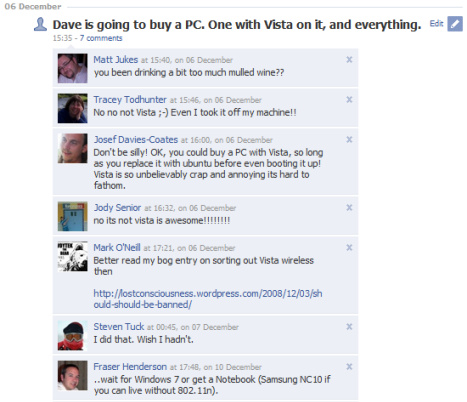
I have just got my new Vista PC up and running. When I announced that I was going to buy such a thing in my Facebook status, it caused something of a reaction:

facebook-vista

Since getting it set up, I have had enormous fun finding and installing all the little bits of software that I want to make things work as close as I can get to how I like them. This included:

Using Chrome has been interesting – it is the first time I have had a proper play with it. It certainly seems quicker than Firefox, which has never been lightening quick. However, after this brief honeymoon period I’ll probably go back to FF if only because of those extensions which make life so much easier.

I’m pleased to see that Windows Live Writer now comes preinstalled with Vista – guess this is part of Service Pack 1? Anyway, WLW is the best bit of desktop blogging software there is. MarsEdit had become my tool of choice on Mac, but it doesn’t have the features or power of WLW. Another software improvement on what is available for Mac is FeedDemon, which is just an awesome RSS aggregator.

Of course, this being Vista, it hasn’t all been fun and games. I ran into several problems when trying to install stuff, with errors popping up about DLLs and that sort of nonsense. A quick Google sorted them out, but of course it isn’t necessary on a Mac…

My reasons for buying a PC is a slightly stupid one: I just felt slightly exposed not having one! With most of the work I do being with government, which is of course hugely dominated by Windows, I always had the fear that not being on the same platform might trip me up at some point. It hasn’t really so far, but I can’t help but think that having a native copy of Internet Explorer to test stuff on has to be a good thing.

The other advantage of buying a PC is that it was pretty cheap: £350 for a desktop box with 6gb RAM and a 500gb hard disk, and a 2.2 ghz processor (whatever that means). Even running Vista Home Premium, it seems to work pretty swiftly.

This PC isn’t going to be my machine of choice – that remains my Mac – but it’s nice to have around, not least just to be able to try new, different stuff.

PermalinkVista, innit

Sunday, 14 December, 2008

Gmail gets better with labs

If you are a Gmail user, you’ll be used to the many benefits that this webmail service provides, like massive storage, great search, powerful filtering and labelling of email, inbuilt instant messaging and voice calls over IP, and the ability to access your email anyway you like with POP and IMAP controls.

However, for a while now Google have been sneaking extra features into Gmail, which you can find by clicking Settings on the top right of the Gmail screen, then on the Labs tab on the settings screen. You’ll then see a big list of extra features you can add – some useful, some silly. Here are the ones I have enabled:

1. Tasks

The Tasks feature is great – building in a simple task list to Gmail, which makes it a doddle to create as many lists of stuff that needs to be done as you like, and attaching emails to them is made really simple: just select the email and then click on ‘Add to tasks’ under the ‘More Actions’ menu. I’m using this at the moment to list all the emails I need to reply to.

2. Quick Links

Adds a box on the left hand side of the Gmail screen allowing you to add as many bookmarks as you like. I’ve got things like admin link for the various blogs I am managing at the moment listed on mine.

3. Superstars

Superstars enables you to click through different types of stars to add to emails to make them stand out a little bit more. Makes things a little more colourful if nothing else.

4. Default ‘Reply to all’

I’m always forgetting to choose the Reply to all link when responding to group emails. This, as it says, makes reply to all the default. Must be careful with this when being rude about people…

5. Forgotten attachment detector

Not perfect, but this scans emails for words like ‘attachment’ or ‘attached’ and, if there isn’t a file attached to the emails, pops up with a warning when you click send. Useful for avoiding those occasional d’oh! moments.

6. Custom label colours

Just like Superstars, helps you differentiate between the different labels you give to emails with colours.

7. Mark as read button

Dead handy this, let’s you mark emails as read with a single click rather than the, er, two clicks it took before. Seriously, I save nanoseconds with this.

8. Google Docs gadget

This gives me a sneaky peek at my Google Docs, letting me open them from within Gmail, which is quite handy.

There are a few other gadgets I don’t use, but which, like the ones I have outlined above, help to make Gmail a kind of portal (I  know I’m not meant to use that word…) to all your online organisational stuff. For instance, there’s a Google Calendar gadget which gives you a preview of what you have on that day. So if you are a user of all these Google services, you can make Gmail your home page and not worry about the rest.

What – if any – of these gadgets are you using? And how do you feel about your inbox becoming the hub of your online life?

PermalinkGmail gets better with labs

Saturday, 13 December, 2008

On Social Reporting

David Wilcox, the godfather of the social reporting concept, has written up his reflections from a couple of days spent at an event in Portugal:

What was unusual, in my experience, was that we had the benefit of a three person team, a good base at the venue, and another team led by Richard Jolly doing the really hard work of capturing more formal interviews with the main speakers. That left us to concentrate on the informal…

We were fortunate in having a work space with power and good wifi, in the middle of the venue. People could find us.

You can find the content from David’s team’s efforts on the event blog.

I’ve just finished a similar gig in Sweden for Cisco, where I was the lone social reporter, but with a remit to try and galvanise some of the delegates to give it a go themselves. I was very lucky to identify Rui Grilo (coincidence that Rui himself is Portugese?) early on in proceedings – Rui clearly got what it was we were trying to achieve and was soon contributing via Twitter, Flickr and the conference blog. Lev Gonick also contributed via Twitter and his own blog (all content tagged with cisco08 was also aggregated on our event blog, through Google Blogsearch’s RSS feeds).

One thing I was pleased about was the layout of the site we used, which managed to capture all the new content with a nice dashboard feel. It being displayed on screens around the venues helped – it really helped delegates get a feel for what was being said.

I would have liked to have done more video interviews than I managed, but being on my tod made it difficult. I did have a couple of Flip cameras to lone out to anyone wanting to help out, but I think that such was the quality of the sessions at the event at the networking inbetween that no-one really had the time to do it!

Overall, though, I think my efforts in Stockholm were a success, and adds to the work that David has done in proving that having a social reporting element is vital for any conference. This is because:

  • It gives a voice to those attending the event, with a direct live feedback loop to event organisers and speakers, etc (if they choose to listen!)
  • They help delegates who are not engaged with the social web find out what is being said online about the event they are attending
  • It can provide background material to place sessions into context
  • It gets content online much quicker for those not attending to be able to view – eg my pretty bad Flip recordings of sessions were available online within a few hours of the sessions ending
  • It also gives those not in attendance the chance to contribute by leaving comments, etc

Many thanks to Paul Johnston of Cisco for inviting me along. Paul is one of those behind Cisco’s community for those who want to make government a little more collaborative, called The Connected Republic. Closing the circle, Paul was interviewed a while ago by one David Wilcox at an event about what this initiative is all about. You can watch it here.

PermalinkOn Social Reporting

Thursday, 11 December, 2008

Cloudcamb, 17th December 2008

This is why I moved to Cambridge – stuff like CloudCamb happening on your doorstep:

All are invited to attend the first Amazon Web Services user group in Cambridge, on Wednesday 17th December. Learn more about getting started from the experts, or discuss your own use of Amazon Web Services with like minded start ups, businesses, scientists and entrepreneurs.

More details at the CloudCamb site.

PermalinkCloudcamb, 17th December 2008

Wednesday, 10 December, 2008

Tuesday, 9 December, 2008

Latest from Stockholm

After the sheer audio/visual genius of the previous two efforts in my video diary chronicling my trip to Sweden, I thought I would do another one. As a bonus, there is another Swedish Confectionary Review at the end.

I decided to give Vimeo a go at hosting this one, rather than YouTube. Vimeo seems easy enough, but I wonder how value there is in using YouTube just because lots of people use it and most people are comfortable with how it works?

Swedish update from Dave Briggs on Vimeo.

If you ask me to stop, I will.

PermalinkLatest from Stockholm

Social reporting at Cisco08 Public Sector Summit

I am having fun here in Stockholm providing social web backup to the Public Sector Summit – an event arranged by Cisco to discuss how technology and government can help each other.

We have quite a bit of activity going on, including the use of twitter and flickr – and shortly I’m hoping to be able to get some video up on YouTube. We also have a group blog, which you can find at www.cisco08.com. Everything gets picked up through use of the cisco08 tag.

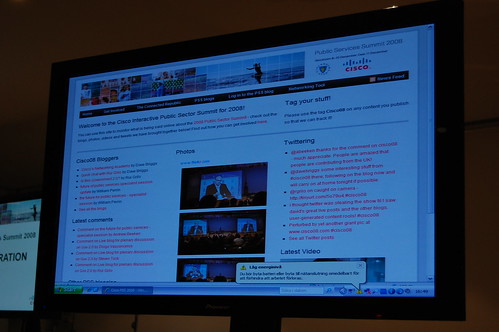
As well as providing a platform for people to use to blog (which they are doing, fantastically) the blog home page also aggregates content from all the different social media services in one place. This is displayed on large screens around the venue so people can see what’s going on (a little bit of javascript refreshes the page every 10 minutes so we don’t have to run around refreshing each one!).

I’d encourage anyone with an interest in government at any level and the way technology can be used to swing by the site and see what you can pick up from it: and of course, leave a comment or send a message on twitter if you want to!

PermalinkSocial reporting at Cisco08 Public Sector Summit

Monday, 8 December, 2008

Travelling to Sweden

I have been rather enjoying myself on my trip to Sweden today, even after a very short night’s sleep in the world’s smallest hotel room.

I kind of even enjoyed waiting for a bus at 4.25am under Heathrow’s terminal 4:

Under terminal 4

But on getting to terminal 5, this FILTHY breakfast gave me some much-needed stamina, I must say.

Wetherbreakfast

I’m delighted to note that my room here in Stockholm is much larger and nicer than the one I was in last night. Here’s a quick video update on that subject and on what I’m actually doing here in Sweden:

PermalinkTravelling to Sweden

Sunday, 7 December, 2008

Hotel Yotel

I’m on my way to Stockholm, where I will be doing some social reporting and blog coaching at Cisco’s Public Sector Summit.

I’m flying from Heathrow tomorrow (Monday) morning, at 7.25am and to save myself a bit of hassle I am stopping over tonight so all I have to do is roll out of bed, onto a bus and I should be at terminal five within ten minutes.

I’m staying in the Yotel in terminal four, which specialises in, well, tiny rooms! I knew it was going to be small, but was quite shocked when I walked in the door of my ‘cabin’. I made a quick video with my Flip Ultra to demonstrate just how bijou this room is:

I must say, I have never been quite so scared of falling out of bed!

PermalinkHotel Yotel

Saturday, 6 December, 2008

An open transition

Another Saturday evening post about how the internet can have a positive effect on the way democracy and government operates. This one is straight from the US.

An Open Transition is a site set up by a coalition of folk including Lawrence Lessig, Mozilla and the Participatory Culture Foundation. It states:

President-elect Obama has made a very clear commitment to changing the way government works with its citizens. To this end, we offer these three principles to guide the transition in its objective to build upon the very best of the Internet to produce the very best for government.

Those three principles are:

  1. No Legal Barrier to Sharing
  2. No Technological Barrier to Sharing
  3. Free Competition

There’s also a video explaining things a bit more:

It will be interesting to follow this one, and see what influence it might have.

PermalinkAn open transition

Us Now

Quite a few folk have been lucky enough to see Us Now, a film made by Banyak Films in association with the RSA. Ivo Gormley directs.

Here is how the film is described on its website:

Us Now is a documentary film project about the power of mass
collaboration, government and the Internet.

Us Now tells the stories of online networks that are challenging the
existing notion of hierarchy. For the first time, it brings together
the fore-most thinkers in the field of participative governance to
describe the future of government.

A great part of the project is that so much material has been made available online. You can see loads of stuff on the Clips page of the Us Now website. I’ve embedded the trailer below, for now.

Any readers of this blog will know that I am passionate about the ways in which advances in web technology can improve the way our democracy and government works. High profile projects like this – trying to draw the thinking together in ways that will get the attention of those not yet involved in the conversation – can only help improve things. Great work.

In a comment on Jeremy’s blog, Ivo mentions the possibility of using the film as the basis of a session at the forthcoming UK government barcamp, next month. What a fantastic idea – sign me up!

PermalinkUs Now

Friday, 5 December, 2008

Bookmarks for November 26th through December 5th

Stuff I have bookmarked for November 26th through December 5th:

PermalinkBookmarks for November 26th through December 5th

Social networking and other tools of engagement

Here are the slides from my talk at Public Sector Forums in Birmingham yesterday. Hopefully they make some kind of sense…

Engagement through social networking

View SlideShare presentation or Upload your own. (tags: psf)

It was an interesting day and I had some great conversations with delegates. The main issues seem to be – as you might be able to guess – the blocking of social web sites in the workplace, and convincing managers and politicians of the value of this type of work.

Some of the other talks were fascinating – not least Dan Champion‘s accessibility assault on web 2.0, which also provided solutions to some of the problems; and Lincolnshire County Council’s use of advertising on their corporate website as a revenue stream. There are plenty of arguments to be had about that one, I’m sure.

It was also a real pleasure to meet one of the other speakers, Medway Council’s Simon Wakeman, whose excellent blog I have been following for a while. Simon spoke with a good deal of knowledge and authority about how Councils should be approaching the use of the web on mobile devices – which will be an increasingly important channel in the future. You can find Simon’s slides here.

Thanks to Ian Dunmore, Jack Pickard, Ian Cuddy and others for laying on such a great event.

PermalinkSocial networking and other tools of engagement

Thursday, 4 December, 2008

Wednesday, 3 December, 2008

ICELE eDemocracy Guides

Alastair Smith at Newcastle City Council today brought my attention to the fact that the ICELE eDemocracy guides were no longer available. Effectively, the link to the page where they were distributed via the Lulu website no longer works.

Luckily for Alastair, and perhaps others, I saved the downloadable PDFs of the guides a while ago, and so now am happy to make them available here on DavePress for folk that want them:

I think I have them all, although four doesn’t seem that many. If you have any others I have missed, do let me know.

PermalinkICELE eDemocracy Guides